Granskningsflöde
Med granskningsflödet har teamet kontroll över vad som går live när det är extra viktigt att alla texter granskats av en människa. Teammedlemmar ser och justerar översättningar i Localhero.ai-dashboarden utan att skriva kod, använda git eller skapa ett ärende. Ändringarna skickas tillbaka till den ursprungliga pull requesten i en commit.
Du kan också välja vilka språk som ska AI-översättas automatiskt, och fylla i översättningarna manuellt i samma gränssnitt för de språk du valt bort.
Hela flödet på 45 sekunder: en pull request lägger till ny text, kontrollen väntar, en granskare godkänner, kontrollen blir grön.
Granska AI-översättningar
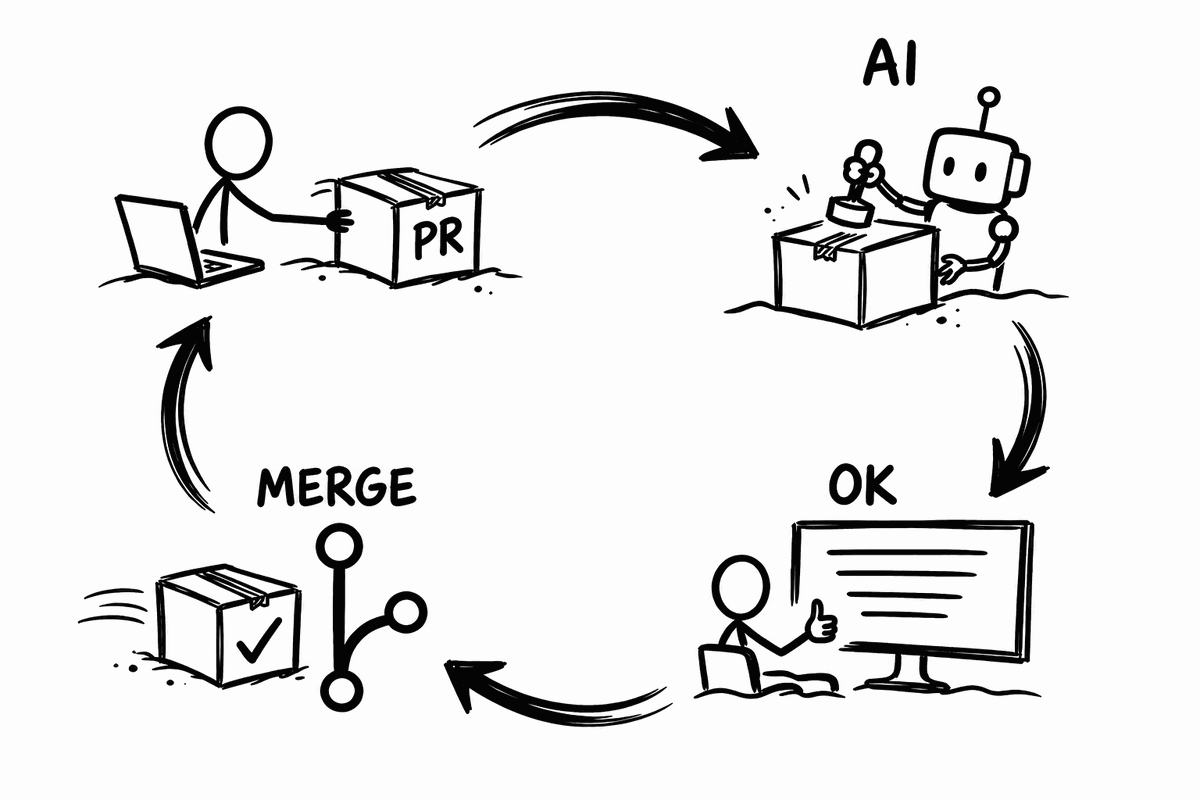
Så här fungerar flödet för den som granskar en pull request:
- En utvecklare öppnar en pull request som lägger till eller ändrar översättningsnycklar i språkfilerna. GitHub-actionen översätter de nycklar som är nya eller saknas och lägger resultatet i pull requesten som en commit. En kommentar postas på pull requesten med en länk till Localhero.ai.
- Alla med tillgång till projektet kan lägga till en eller flera granskare. Varje tillagd granskare får ett mejl med en länk för att se översättningarna och justera dem efter behov.
- Granskaren ser översättningarna i stället för en koddiff och rättar det som behövs. Ändringarna sparas i Localhero.ai. Varje rättning går också in i projektets översättningsminne, som senare översättningar följer.
- När granskaren är klar godkänner hen pull requesten och kan lämna en kommentar. PR-sidan på Localhero.ai visar hur många granskare som har godkänt den och visar "Klar för merge" när alla är klara. När samtliga granskare godkänt postas en kommentar om det på pull requesten i GitHub.
- Om någon översättning har ändrats klickar du eller granskaren på Synka till GitHub på PR-sidan i Localhero.ai. Då skickas ändringarna tillbaka som en commit till pull requesten, så allt är med vid merge.
Översättningskontrollen på pull requesten
Översättningar kan styra merge-knappen på PR:en, precis som ett test som inte går igenom kan hindra att en PR går att merga. När en granskare godkänt rapporterar Localhero.ai en commit-status som heter localhero/translations på pull requesten, bredvid era egna CI-kontroller, med texten Translations approved on Localhero. Statusen länkar till PR-sidan, så den som läser pull requesten kan gå direkt till översättningarna.
Om du gör den till en obligatorisk statuskontroll blir det ett villkor för att kunna merga pull requests: Settings → Branches → Branch protection rules, redigera regeln för din standardbranch, kryssa i Require status checks to pass before merging och sök upp localhero/translations. Kontrollen måste ha körts minst en gång i repot innan GitHub visar den i listan, så godkänn först översättningar på en pull request.
Då går det inte att merga en pull request med tillagda granskare förrän översättningarna är godkända. Ingen process att komma ihåg, inget letande på releasedagen efter om den norska texten någonsin blev läst. Lämnar du kontrollen utanför branch protection är den informativ, en grön bock som visar att översättningarna är granskade.
Ett godkännande hör ihop med exakt de översättningar det gavs för. Ändrar du en text efter att någon godkänt märker Localhero.ai godkännandet som inaktuellt på PR-sidan och erbjuder Godkänn igen. Ett godkännande betyder att någon har läst den här texten, inte en text som hunnit ändras sedan dess.
Du kan också redigera översättningar direkt på översättningssidan utan att utgå från en pull request. Markera de översättningsnycklar du har ändrat och klicka på Exportera till GitHub uppe till höger. Localhero.ai öppnar då en pull request med ändringarna.
Båda funktionerna kräver att GitHub-appen är installerad, eftersom den har behörighet att skriva till ditt repo. Utan appen kan du fortfarande granska och redigera i dashboarden, men du kan inte skicka ändringarna tillbaka till GitHub. Hämta då översättningarna lokalt med CLI:t i stället.
Lägga till granskare
Tillgång till projektet i Localhero.ai är allt en granskare behöver. Bjud in dem via fliken Medlemmar i organisationsinställningarna. De behöver varken ha git installerat eller en kodredigerare.
Utvecklarna behåller sitt vanliga flöde. Det är fortfarande språkfilerna i repot som gäller. Översättningsnycklarna läggs till där, och översättningarna läggs till som commits i pull requesten. Varken utvecklare eller granskare behöver byta verktyg.
Översätta vissa språk själv
För varje målspråk i projektinställningarna kan du slå av Automatisk översättning. Stänger du av den för ett språk skapar Localhero.ai inga översättningar för det. GitHub-actionen och CLI:t hoppar då över att generera översättningar för språket. Nycklarna och språket finns fortfarande kvar i dashboarden, där din egen översättare kan fylla i översättningarna.
Användbart när text ska skrivas direkt på målspråket i stället för att översättas, när du har särskilda behov på olika marknader, vid juridiskt känsliga formuleringar eller för en variant med särskilda krav.
Läs vidare: GitHub-appen om vad appen kan skriva till ditt repo, och översättningskvalitet i stor skala om hur du får konsekventa översättningar när antalet översättningsnycklar växer.
Last updated
Redo att testa?
Kom igång på några minuter. Inget kreditkort behövs.