
When it comes to actually localizing your Rails or React app, finding the docs for your framework's i18n library is usually pretty easy. The tricky things come with everything around them, and what's needed to make it actually work well for your team over time. Most of that you learn the hard way. This post goes through some of the things that tend to come up.
If you haven't set up i18n yet, I'd start with How to Localize a Ruby on Rails App or How to Localize a React and Next.js App first. This one assumes the basics are in place.
What end-to-end means
Running a localized SaaS means getting a handful of things working together:
- Locale files and translation updates: where translations live, how new strings get added by who, how existing ones get adjusted as the product evolves, and how they deploy.
- Locale switching and routing: how a user ends up on the right language and stays there.
- User-generated content: the strings your users type, which aren't in your locale files.
- Emails and notifications: sent asynchronously, longer texts often without request context.
- SEO: hreflang, canonicals, sitemaps, per-language strategy.
- Multi-tenancy: per-user, per-org, per-market defaults that interact in awkward ways.
1. Locale files and translation updates
Many times translations live in the repo as structured files. For Rails that's config/locales/*.yml. For React and Next.js it's usually messages/*.json or public/locales/{lang}/*.json. For Django, PO files under locale/.
A few things that matter here:
Have one clear source of truth. Whether that's the repo or a tool's backend, pick one and make sure everyone works from it. What tends to cause pain is when translations live in two places that sync
with each other, and the two copies drift over time. The day you spend reconciling them costs more than any feature the tooling offered. This is common with TMS platforms like Lokalise, Phrase, or Crowdin when they're not set up carefully, and it's one reason teams sometimes prefer a lightweight TMS that lives in your pull requests, like Localhero.ai. We've written up the longer argument in SaaS Localization Without a TMS. For an overview of where the money actually goes, see What SaaS Localization Actually Costs.
Namespace by feature. A flat file with 3,000 keys is unreadable. One file per feature (billing, onboarding, settings) is much easier to live with. In Rails, load multiple files via config.i18n.load_path. In React, one JSON per area. It's usually worth spending some time documenting a convention for this early on, because refactoring it later is a pain.
Treat locale files as code. Review them as needed. When a developer adds a key in English, the PR should show both the source and the generated translations side by side. Merging the feature means merging the translations.
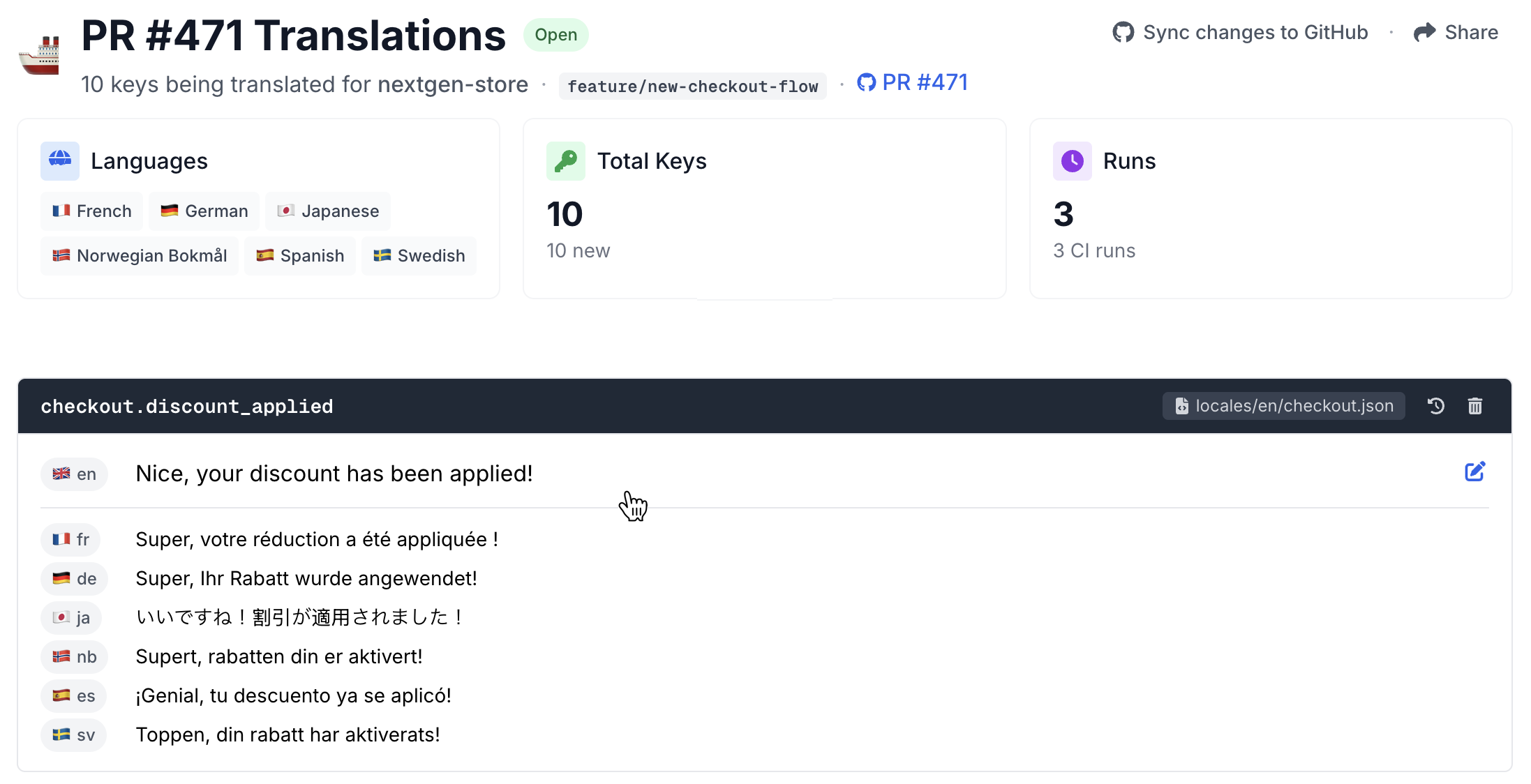
Example of PR translation review in Localhero.ai.
For how to get the CI side of this going, we've written that up in Automate SaaS Localization in Your CI Pipeline.
2. Locale switching and routing
A common locale bug that tends to come up: user signs in, app forgets their preference, they see English but signed in on the Norwegian website. The fix is usually just deciding on a resolution order and sticking to it:
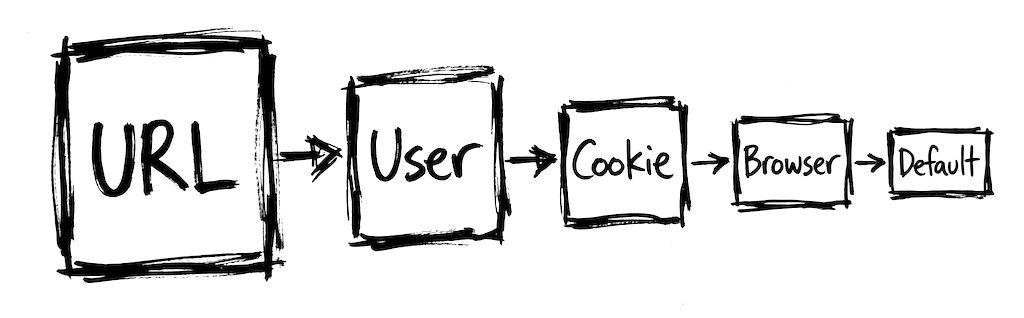
- Explicit URL (e.g.
/sv/dashboard) if you use path-based routing for public pages. - User preference from their profile, if they're logged in.
- Cookie from their last session.
Accept-Languageheader from the browser.- Default locale.
Relying on cookies alone is tempting but tricky to get right. They expire, they don't exist on first visit, and search engines don't send them, which means your SEO pages need a cookie-independent strategy. Cookies work well as one step in the chain, not as the only mechanism.
In Rails:
# app/controllers/application_controller.rb
class ApplicationController < ActionController::Base
  before_action :set_locale

  def set_locale
    I18n.locale = extract_locale_from_url ||
                  current_user&.locale ||
                  cookies[:locale] ||
                  extract_locale_from_accept_header ||
                  I18n.default_locale
  end

  private

  def extract_locale_from_url
    parsed = params[:locale]&.to_sym
    I18n.available_locales.include?(parsed) ? parsed : nil
  end

  def extract_locale_from_accept_header
    header = request.env["HTTP_ACCEPT_LANGUAGE"]
    return nil unless header

    preferred = header.scan(/[a-z]{2}/).first&.to_sym
    I18n.available_locales.include?(preferred) ? preferred : nil
  end
end
For Next.js App Router, next-intl handles most of this through proxy.ts (or middleware.ts on Next.js 15 and earlier), but the principle is the same: pick an order, document it, test it.
URL strategy
Three options that you usually see for public pages:
- Path-based (
example.com/sv/pricing). Easiest for SEO, no DNS config. This is what I'd pick by default. - Subdomain (
sv.example.com/pricing). Useful for true regional sites, overkill for a SaaS dashboard. - Query parameter (
example.com/pricing?locale=sv). Easy but weak for SEO and sharing. Avoid it on marketing pages.
For the logged-in dashboard, you probably don't need locale in the URL at all. User preference is enough.
A small Rails trick to keep routes DRY:
# config/routes.rb
scope "(:locale)", locale: /#{I18n.available_locales.join("|")}/ do
  resources :posts
end
That gives you both /posts (default) and /sv/posts from one definition.
3. User-generated content
The i18n library translates your strings, not your users' strings. Project names, tasks, comments, custom labels, those aren't in your locale files. Ship a multi-language SaaS without thinking about this and you can end up with a half-translated product.
A few patterns, from simple to more involved for handling this:
Leave UGC alone. The user's content stays in whatever language they wrote it. Your UI is translated. For most SaaS products this is the right default. Don't machine-translate Project Alpha
into Swedish.
Let users translate their own metadata. If users create category labels, offer a translations field per category. Optional and user-driven. One thing to consider: if your product doesn't handle multiple languages within a single workspace, customers who need multilingual content may have to set up separate workspaces. Worth thinking through how this affects cost and complexity on their side.
On-demand translation for public UGC. Marketplaces, knowledge bases, public posts. A translate this
button powered by an LLM API call, translated on user request and cached. Not eager.
The main thing to get right at the data model level is whether a field needs to store strings in multiple languages. A plain name column can become a translations table (or a JSONB column per language) later, but refactoring that after the fact can be painful. If you know a field will need it, build it in early.
4. Emails and notifications
A common thing, user signs up in Swedish, sees Swedish onboarding, then gets a welcome email in English. Or a notification fires from a background job with no request context, so I18n.locale defaults to the application default.
In Rails, most emails go through a job. Jobs don't have request context, so you either pass the locale explicitly:
class WelcomeEmailJob < ApplicationJob
  def perform(user_id, locale:)
    I18n.with_locale(locale) do
      user = User.find(user_id)
      UserMailer.welcome(user).deliver_now
    end
  end
end
Or resolve it from the recipient:
def perform(user_id)
  user = User.find(user_id)
  I18n.with_locale(user.locale || I18n.default_locale) do
    UserMailer.welcome(user).deliver_now
  end
end
Pick one and apply it consistently. Mixing the two is how bugs hide.
A few things that help for transactional email specifically:
- Keep templates short and use i18n keys for every user-facing string.
- Test rendering in every language via CI. A test like
WelcomeMailer.welcome(user, locale: :sv)that renders without missing keys catches most regressions. - For marketing emails and drip campaigns, consider a human review pass in your top markets. The bar is higher than in-app copy. Make it easy to preview emails in each language, and have a process for non-developers to tweak translations if needed.
Same pattern applies for push and in-app notifications. Resolve locale from the recipient, wrap in I18n.with_locale, test every locale in CI.
5. SEO for multi-language marketing pages
This doesn't apply to the logged-in dashboard, but most SaaS products have a marketing site.
hreflang tags. Tell search engines which language variants of a page exist. See MDN: hreflang for the spec. Rendered into the <head> of your page, it looks like this:
<head>
  <title>Pricing</title>
  <meta name="description" content="Simple pricing for every team size.">

  <link rel="alternate" hreflang="en" href="https://example.com/pricing" />
  <link rel="alternate" hreflang="sv" href="https://example.com/sv/pricing" />
  <link rel="alternate" hreflang="de" href="https://example.com/de/pricing" />
  <link rel="alternate" hreflang="x-default" href="https://example.com/pricing" />

  <link rel="canonical" href="https://example.com/pricing" />
</head>
Include a self-referencing hreflang and an x-default for users whose language you don't serve. Also make sure the tags are bidirectional, each language variant should reference all the others. Without these, Google can show the wrong language in results.
Canonical URLs. Each language version points to itself as canonical. Don't canonicalize every language to the English page. Search engines will just ignore the translations.
Sitemaps. List all language versions of each page. Most SEO tools do this if you tell them about your locales.
Translated metadata. Titles, meta descriptions, OG tags. These go in the locale files. Translating the body and leaving the title in English is a common SEO mistake you see when you have your localization glasses on.
Content strategy. Google treats each locale as an independent page that has to rank on its own. Translations that nothing links to and nobody searches for won't rank even if they exist. For small teams, focus on translating the pages that actually drive acquisition: start page, pricing, top docs. Not every blog post in every language.
6. Multi-tenant locale preferences
For B2B SaaS, locale tends to be a three-level problem:
- User preference: the individual's language.
- Organization default: what new users in this org see.
- Market default: what the workspace seeds to, based on detected market.
These interact in awkward ways. A few cases:
- A US-based org with a Swedish employee. The employee's UI is Swedish. Shared emails to the whole org probably go out in English, or in each recipient's language.
- A German org with an English-speaking executive. Their UI is English, but customer-facing exports (invoices, reports) should be in German.
- A user switches orgs mid-session. Their personal preference stays, org defaults refresh.
A data model that works well for this:
class User < ApplicationRecord
  belongs_to :organization

  def effective_locale
    locale.presence || organization.default_locale || I18n.default_locale
  end
end

class Organization < ApplicationRecord
  # default_locale: the org's default for new users
  # market: seeds defaults, doesn't override user preference
end
And every piece of code that formats something for display should use effective_locale, not I18n.locale. Especially background jobs. I've shipped that bug more than once.
Deploying translations
Two approaches that work:
A. Translations in git, deployed with code. Default for most teams. Atomic, rolls back cleanly, code and translations never drift. Every translation update is a deploy.
B. Translations loaded from a CDN or API at runtime. Non-developers can update without a deploy. Trade-off is two sources of truth, caching, and the risk of translations being out of sync with code that references them.
For most SaaS teams, A tends to be the simpler path and the one you see most often. Option B only makes sense when non-developers edit translations frequently and a deploy would be a real bottleneck. It usually requires more from your tooling and becomes more of a content operation than a developer workflow. That makes sense for a big consumer app with a large localization team, but is usually overkill for a SaaS.
Either way, the source translations need to get into the PR somehow via CI, and that part is code. More on that in Automate SaaS Localization in Your CI Pipeline.
Quality checks in CI
This can be a great addition to set up to avoid mistakes that affect end-users. Things to catch before production with a GitHub Action that runs on every PR:
- Missing keys. A string referenced in code that doesn't exist in a locale file. Most frameworks let you fail the test suite on this. Turn it on.
- Placeholder mismatches.
"Hello, %{name}"in English and"Hej"(no placeholder) in Swedish is a runtime bug waiting. - Plural form mismatches. Polish, Russian, and Arabic have plural forms English doesn't.
- Unescaped HTML. Translators sometimes
fix
HTML. Render each template in each language as a test. - Layout overflow. German can be up to 35% longer than English. Swedish compound words can be brutal. Visual regression tests per language start to pay off once you're past a handful of languages, tricky to get working well but can be worth it if you have the resources.
More on the quality side in Translation Quality at Scale and How to Evaluate AI Translation Quality.
Putting it all together
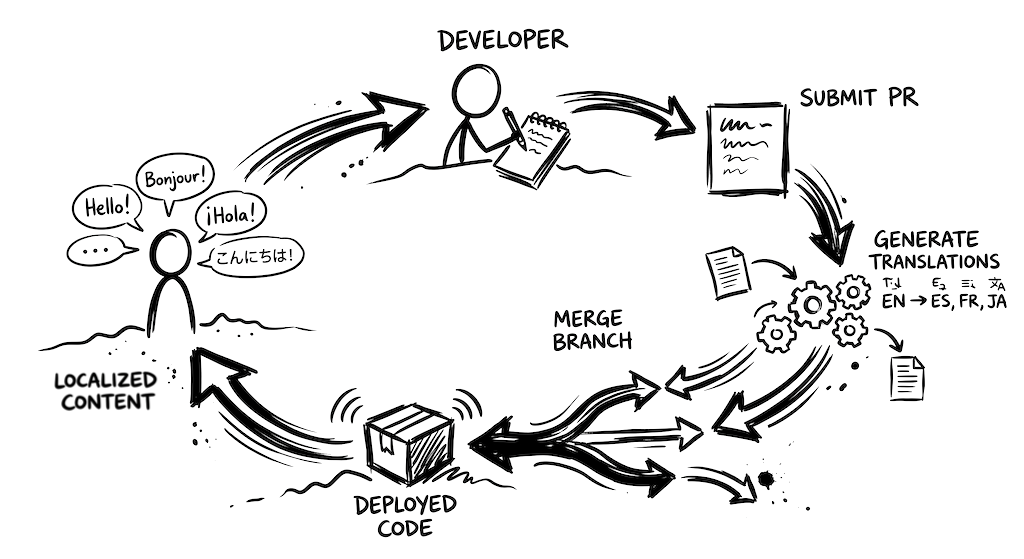
What a full stack can look something like this in practice:
- Developer adds new keys in English.
- CI detects them, calls a translation service, commits translations to the PR branch.
- PR shows source and translations side by side.
- CI quality checks catch placeholders, plurals, missing keys.
- Optional: non-developer teammate tweaks a translation in a review UI, synced back to the PR.
- PR merges. Translations deploy with the code.
- Locale resolver picks the language from URL → user preference → cookie → browser → default.
- Emails and jobs resolve locale from the recipient.
- Marketing pages handle
hreflang, canonicals, and translated metadata. - Per-tenant preferences live at the org level, user preference overrides.
Code, CI, and a translation service that fits into the workflow your team already has. With a setup like this, localization and translations can become a seamless part of your development process instead of a separate workflow that needs to be managed and coordinated.
If you're looking for a developer-focused tool for this kind of setup, I'm building Localhero.ai for exactly that. See how it works, or have a look at the Rails and React guides for framework-specific setup.
FAQ
What does the framework i18n documentation leave out? The setup, mostly. Rails I18n and next-intl both document locale files, interpolation and pluralization well. That part is usually a day's work. What you learn later: how a user ends up on the right language and stays there, what happens to content your users typed rather than you, how a background job knows which language to send an email in, how search engines are told which page is which, how per-user and per-organization language preferences interact in a B2B product. None of those are hard individually. They're just not in the i18n docs, since they're not i18n library problems.
How should locale resolution work in a multi-language app?
Pick an order, write it down, test it. The bug where a signed-in Norwegian user sees English comes from having no agreed order rather than from any single broken step. A chain that holds up: explicit URL first if you use path-based routing, then the user's saved profile preference, then a cookie from their last session, then the browser's Accept-Language header, then your default. Cookies are tempting as the only mechanism and it doesn't work out. They expire, they don't exist on a first visit, they're never sent by search engines. Your public pages need something cookie-independent anyway.
Should we translate user-generated content?
Usually not. Leaving it alone is a real decision rather than a punt. Your UI is translated, your users' project names and comments stay in whatever language they were written in. Machine-translating Project Alpha
into Swedish helps nobody. Two exceptions worth building for: user-created metadata like category labels, where you can offer an optional per-language field. And public UGC on marketplaces or knowledge bases, where an on-demand translate this
button with caching beats translating everything eagerly. The decision that's expensive to reverse is at the data model level. If you know a field will need multiple languages, build it that way before it has a million rows.
Why do localized emails so often go out in the wrong language?
Because emails are sent from background jobs and jobs have no request context. I18n.locale quietly falls back to your application default. The user signs up in Swedish, sees Swedish onboarding, then gets an English welcome email. Fix it by resolving locale from the recipient and wrapping the send in I18n.with_locale, or by passing the locale into the job explicitly. Either works. Mixing the two across a codebase is what lets the bug hide. Add a CI test that renders each mailer in every language, which catches missing keys before your users do.
What SEO work does a multi-language marketing site need?
Four things, all of them easy to half-do. Bidirectional hreflang tags including a self-reference and an x-default, which tell Google which variants exist. Per-language canonicals pointing at themselves, since canonicalizing every language to the English page tells search engines to ignore your translations entirely. All language versions listed in your sitemap. And translated titles, meta descriptions and OG tags, which live in your locale files. Translating the body and leaving the title in English is the mistake you start seeing everywhere once you're looking. Beyond the tags, Google ranks each locale as its own page. Translated pages nobody links to won't rank just for existing. Small teams do better translating the pages that drive acquisition than translating every blog post into every language.
Should translations live in git or be loaded at runtime? Git, for most SaaS teams. Translations deploy atomically with the code that references them, roll back cleanly and can't drift out of sync with the keys in your templates. Runtime loading from a CDN or an API lets non-developers publish without a deploy. The price is two sources of truth plus caching behavior to reason about. That trade makes sense for a large consumer app with a dedicated localization team editing copy daily. It's usually overkill for a SaaS, turning localization into a content operation instead of a developer workflow. Either way the source strings have to get into the PR somehow. That part is CI. Localhero.ai runs it as a GitHub Action on pull requests, or as the CLI on any runner with a shell.
How do Rails and React localization differ in practice?
Less than you'd expect at the workflow level, which is why a mixed stack is manageable. Rails keeps YAML under config/locales, loads multiple files via config.i18n.load_path and handles locale in a before_action. React and Next.js keep JSON, usually under messages/ or public/locales/{lang}/, with next-intl handling routing through proxy or middleware. The conventions worth applying to both: namespace files by feature rather than keeping one 3,000-key file, treat locale files as code and review them in the PR, use an effective-locale helper everywhere you format for display rather than reading the global locale. Localhero.ai handles Rails YAML, the JSON catalogs used by i18next, next-intl, react-intl and vue-i18n, plus gettext .po for Django, Phoenix and Lingui. A Rails API with a React frontend can run one project across both repos with one glossary.
Further reading
- How to Localize Your SaaS With a Small Team - the small-team playbook
- SaaS Localization Without a TMS - when the CI-native stack is a better fit
- Automate SaaS Localization in Your CI Pipeline - the CI setup this post relies on
- How to Localize a Ruby on Rails App - Rails i18n basics
- How to Localize a React and Next.js App - React/Next.js i18n basics
- What SaaS Localization Actually Costs - where the money actually goes