
Developers (and the coding agents working alongside them) tend to want translation tooling that behaves like the rest of their infrastructure: version-controlled, scriptable, CLI-first, deterministic. What they often get is a SaaS dashboard and a sync layer that can break when a translation file gets renamed or easily get out of sync with the actual code. There's a simpler version that is built to fit with how most product teams already work.
What continuous localization means here
A lot of vendors use this phrase to mean our platform lets you push strings more often.
That's not quite what we're after. A few properties tend to matter more in practice:
- The repo stays the canonical copy that ships to production.
- New strings get translated automatically on every PR that introduces them.
- Translations deploy with the code. Same pipeline, same commit, same rollback.
- The same input produces the same output, reproducibly.
- The tooling fits into normal developer workflows: config in the repo, logs you can grep, commands you can run locally.
When a workflow misses most of these, it tends to feel more like a separate translation process than something continuous.
The shape of the pipeline
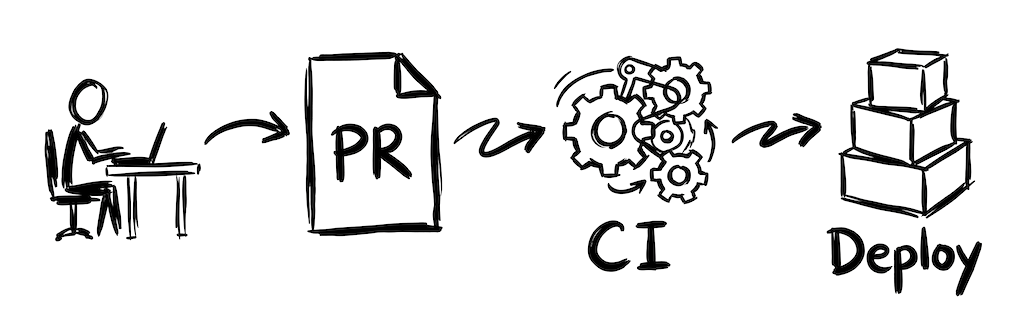
Developer adds source keys. CI detects them, calls a translation service, commits the translations back to the branch. Reviewer sees both at once. Merge deploys both.
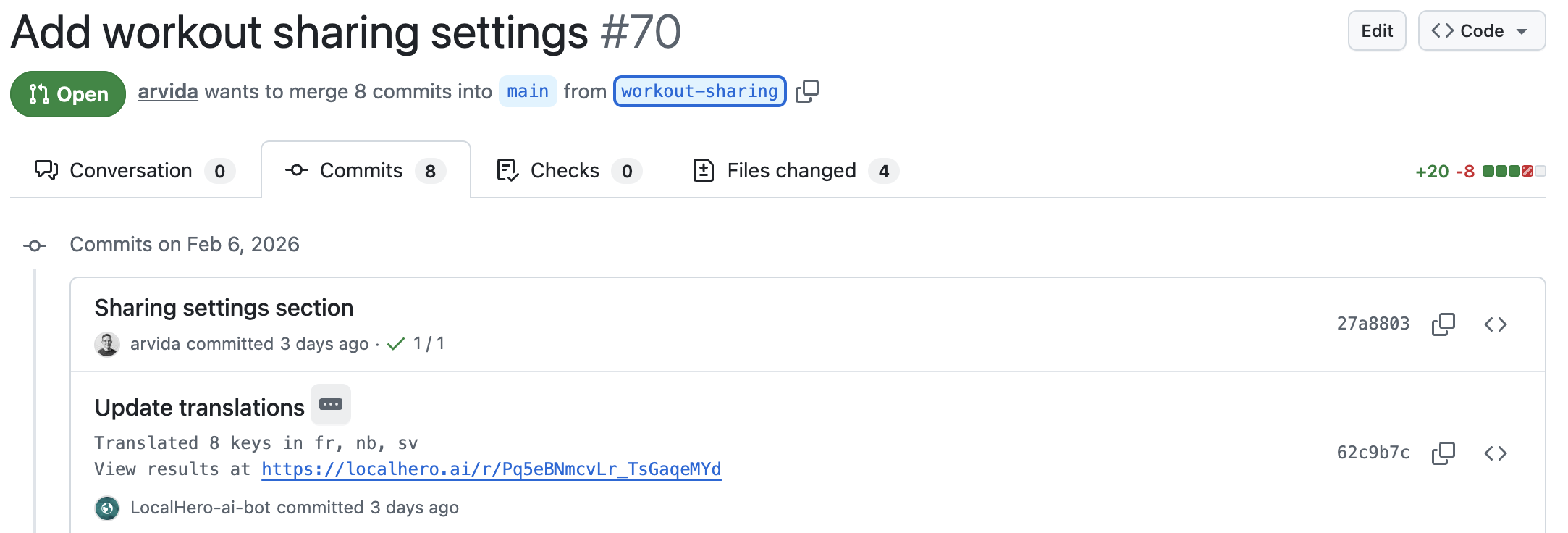
Example of a GitHub Action running translations on a PR in Localhero.ai.
It can be a single job in your CI config. For the three common shapes of that job (DIY with an LLM API, dedicated service, self-hosted), we've written working examples in How to Automate i18n Translations with GitHub Actions.
Why this works well for product teams
Git is a natural home for strings. You can git blame a translation, revert it, diff it, merge it. When a translation breaks something in production, you can use git to find it in seconds. A separate audit log in a TMS (Lokalise, Phrase, Crowdin) plus deploy logs can turn a quick fix into an hours-long debugging session.
Translations belong close to the PR. Developers can't realistically review translations in every language, but they can see what changed and pull in the right person when it matters. Good automation keeps that pull someone in
moment rare. When it does happen, the person tweaking the translation shouldn't need to open a PR or know git. With a good review and QA flow, adjustments happen before merge, not as a separate task afterwards.
Fewer moving parts. Every sync layer between two systems is a place where strings can get lost. A missed file rename, a webhook that didn't fire, a merge conflict that quietly ate translations. Keeping the repo as the canonical copy removes a whole class of bug.
The longer version is in SaaS Localization Without a TMS.
The job
Whatever CI system you use, the shape is probably something like this:
- Trigger on changes to source locale files.
- Check out the branch with write permission.
- Diff the source files against the base branch to find new or changed keys.
- Call the translation service for just the delta.
- Commit the translations to the PR branch.
- Skip on draft PRs, bot commits, and labeled exceptions.
In GitHub Actions, it can be as simple as running a script when source locale files change:
name: Translate
on:
  pull_request:
    paths:
      - 'locales/**'

jobs:
  translate:
    runs-on: ubuntu-latest
    steps:
      - uses: actions/checkout@v4
      - run: npm run ci-translate
Whether ci-translate is a custom script calling an LLM API, a wrapper around a dedicated service, or something self-hosted is up to you. We've written walkthroughs for each shape in How to Automate i18n Translations with GitHub Actions.
Operational gotchas
At small scale, pretty much any of these workflows works fine. Once you're at a few hundred PRs a month, ten-plus languages, and multiple translation files, the details start to matter. Here's what tends to come up after a few months.
Only translate what changed
The main reason to diff against the base branch and translate only the delta: respect the work that's already there. Existing translations may have been tweaked by a native speaker, adjusted for tone, or corrected after a support ticket. Re-translating them on every PR overwrites that work silently. A developer adding a billing string shouldn't unknowingly change the onboarding copy in seven languages.
It also happens to be faster and cheaper, but that's secondary. The main thing is focus: each PR touches only the strings it introduces, not everything that happens to be in the repo.
Standard implementation: fetch the base branch, parse source files from both, compute a key-level diff, only send new and changed keys to the service.
This also helps with concurrent PRs. When two branches both add strings, rebasing against the target before translating keeps them from stepping on each other. Most dedicated services handle this automatically. DIY scripts usually need a small rebase wrapper.
Don't loop
If the translation bot commits to the branch and CI re-triggers on any commit, you'll loop until you run out of minutes. A few fixes:
- Filter out commits authored by the bot.
- Only trigger on source locale file paths (which the bot's commit won't touch if it only writes target files).
Catch quality issues early
The worst failure mode is a silent bad translation: a missing placeholder, a dropped tag, a wrong plural form. Make sure your pipeline has checks for:
- Placeholder parity: every
%{name}in the source has a match in every target. - Plural form completeness per target language.
- HTML tag balance.
- Length sanity: a translation 10x longer than the source is probably wrong.
How these get handled depends on the tool. Structural issues like missing placeholders or malformed HTML can often be auto-fixed by re-prompting the model to correct them. Judgment calls (does this translation fit the tone? Is the term consistent with the glossary?) usually need human review and should be surfaced in the PR with a clear flag. A good setup fixes what it can automatically and highlights what it can't, so humans only get pulled in when it's actually needed.
Skip bot PRs, drafts, and explicit opt-out
- Bot PRs (Dependabot, Renovate): no point translating lockfile changes.
- Draft PRs: work in progress, skip until they're ready.
Most dedicated services handle these. For a DIY script, add the filters up front.
Log the pipeline
Log each run. How many keys translated, per language, how long, what it cost. Dump it somewhere searchable. When a translation looks wrong three weeks later, you want to find the run that produced it.
This is one of the places where a dedicated service tends to save time. You get logs and dashboards out of the box. DIY means building this yourself.
Deploy, don't stage
A failure mode that tends to come up: translations land in PRs, but never really make it to production because there's a separate translations release.
A localization manager batches them up, reviews, pushes once a week.
That's not continuous. It's just a slower separate process.
If code deploys continuously, translations should too. The release is the PR merge. If that feels scary, the fix is better quality checks and better in-PR review, not a manual batch release.
The determinism question with LLMs
CI is supposed to be deterministic. Same code, same output. LLMs are not deterministic by default. The same input can produce slightly different translations each call.
A few things help:
- Cache by input. Most services cache by source string. If the source hasn't changed, the translation from last time is reused. That turns
non-deterministic LLM
intodeterministic lookup for strings we've seen.
- Low temperature. For a DIY setup, keeping the LLM temperature low reduces variance.
- Glossary enforcement. A glossary with strict matching means
Dashboard
is alwaysInstrumentpanel
in Swedish. Every time.
With all three, the pipeline behaves deterministically in practice, even though the underlying translation is probabilistic.
CLI and CI first, UI where it helps
Traditional localization tooling puts a dashboard front and center, with the CLI as an afterthought. For a product team that ships through PRs, that's backwards. The flow you actually want is CLI and CI at the core, with a UI layered on top for the parts that benefit from one.
A few things to look for in a tool that fits developer workflows:
- Commands you can run locally to preview what the CI would do.
- Config in a file in the repo, reviewable in a PR.
- Logs you can tail.
- An API that behaves like any other API.
A solid CLI also matters more now that coding agents are part of the picture. Claude Code, Cursor, and similar tools work through the command line and read config from your repo. A translation tool that exposes a CLI can plug into the agent's workflow the same way tests and linters do. We've written more about this in Your Coding Agent Should Handle Translations Too.
On top of that, a good review UI is genuinely useful. Not for developers, but for teammates who don't work in code: content people, product managers, native speakers on the team. They can tweak a translation without opening a JSON file or touching git. Changes sync back to the PR and ship the same way code does.
The base layer is CLI and CI. The UI is there for the people it actually helps.
What it looks like when it's working
After a few months of running this:
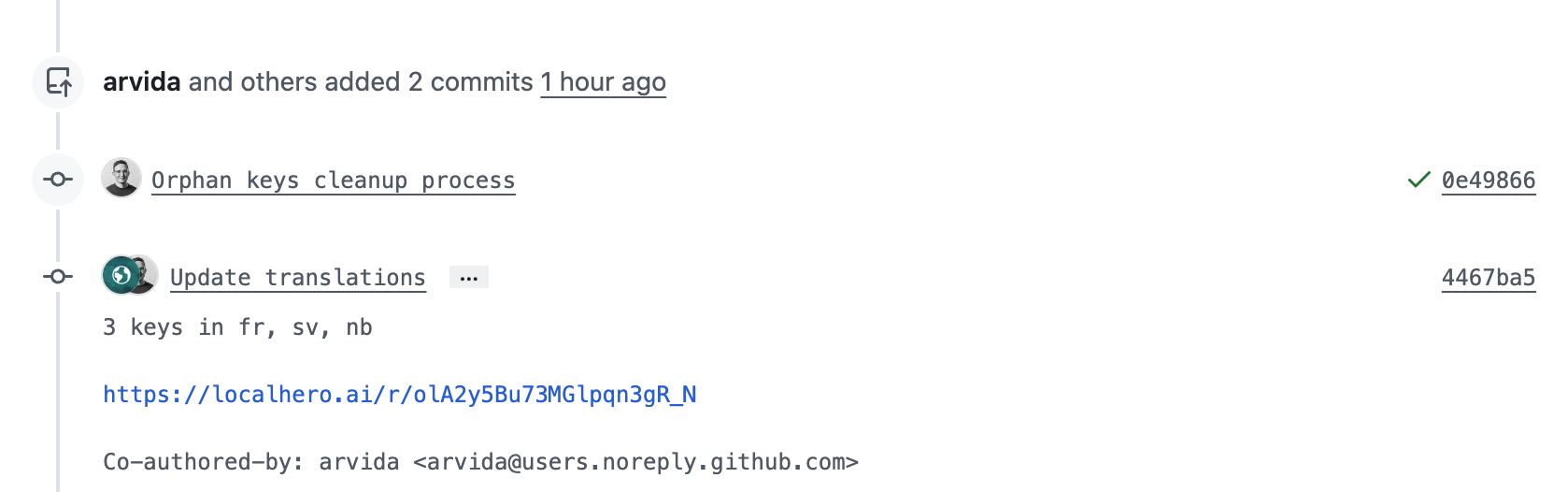
A translation bot committing back to the PR branch.
- Developers (and their coding agents) stop thinking about translations. Source keys get added. Translations appear.
- PRs show code and translations together. One review, not two.
- Every merge deploys a complete product in every language.
- Glossary, style guide, and CI checks hold the quality line.
- When something goes wrong, git blame tells you what and when.
- The team spends very few hours a month on localization, focusing on building the product, not managing translations.
That's continuous localization. An invisible pipeline that keeps the product translated without anyone having to manage it.
Getting there from where you are
If you're on a manual process, an agency handoff, or a TMS you'd rather not be running, a good order to tackle things:
- Start with a POC. Pick a small slice of the product and get the CI translation loop working end-to-end locally. Just enough to see that source keys → translations → PR actually flows the way you expect.
- Set up CI once the local flow feels right. Add the job to a real branch, see translations land in an actual PR, confirm reviewers see what they need to see.
- Write down what's in people's heads. A short glossary of product terms you've already decided on, a few bullets on tone per language, the conventions you use for keys. It doesn't have to be exhaustive, the goal is to get the tribal knowledge documented so the automation and future teammates, both human and coding agents, can work from the same reference.
- Decide what stays out of scope. Marketing pages, legal copy, and anything with real brand or liability risk often still benefit from human translation or agency review. Name those surfaces explicitly so the team knows what the automation handles and what it doesn't.
- Agree on review and tweaking. Who reviews, when, and how do non-technical teammates suggest changes. A review UI helps here, but even a shared checklist is better than nothing.
- Get your coding agents up to speed. Most teams use Claude Code, Cursor, or similar these days, and they'll happily write i18n keys the wrong way if they don't know your conventions. More on that in Your Coding Agent Should Handle Translations Too.
- Turn off the old process or narrow it. Once the pipeline is stable, you don't want two systems running in parallel.
In my experience, the tech side comes together quickly with the right tools in place. A DIY setup tends to take more fine-tuning and iteration before it feels solid. The glossary and style work usually happens in parallel and gets richer over time. The payoff is that translations stop being something anyone has to think about day to day.
If you're looking for a lightweight TMS that lives in your pull requests, I'm building Localhero.ai for exactly that. CLI-first, a GitHub Action in the pipeline, and a review UI for when you want one. See how it works, or check out How to Automate i18n Translations with GitHub Actions for the full setup walkthrough.
FAQ
What is continuous localization?
Most vendors use the phrase to mean you can push strings to our platform more often,
which isn't the interesting version. The properties that matter in practice: the repo stays the canonical copy that ships to production, new strings are translated automatically on the PR that introduces them, translations deploy with the code through the same pipeline and the same rollback, the same input reproducibly gives the same output. And the whole thing behaves like normal developer tooling: config in the repo, logs you can grep. A workflow missing most of those is a separate translation process on a shorter timer.
How do you stop a translation bot from triggering itself in an infinite loop? Two filters, both worth having. Filter out commits authored by the bot so its own push doesn't re-trigger the job. And trigger only on source locale file paths, since the bot writes target files, which means its commit doesn't match the trigger in the first place. Skip either one and you'll find out at the end of the month when your CI minutes are gone. While you're there, add skips for draft PRs and for bot PRs from Dependabot or Renovate. Translating lockfile changes is pure waste.
Should CI translate every key or only the ones that changed?
Only the delta. The reason people usually give (speed and cost) is the secondary one. The real reason is that existing translations have often been tweaked by a native speaker, adjusted for tone, or corrected after a support ticket. Re-translating everything on every PR silently overwrites that work. A developer adding one billing string ends up changing the onboarding copy in seven languages without knowing it. The implementation is standard: fetch the base branch, parse the source files from both sides, compute a key-level diff, send only new and changed keys. The gotcha is that most CI systems do a shallow clone by default, which leaves nothing to diff against. The job then translates either everything or nothing. In GitHub Actions that's fetch-depth: 0.
Can an LLM-based pipeline be deterministic enough for CI?
In practice yes, though not because the model itself is deterministic. Three things get you there. Caching by input, which lets an unchanged source string reuse the translation you already have and turns most of the pipeline into a deterministic lookup. Low temperature, if you're calling the API yourself. And glossary enforcement, which makes Dashboard
come out as Instrumentpanel
in Swedish every time rather than most of the time. With all three the pipeline behaves predictably even though the underlying translation is probabilistic. Localhero.ai handles the caching and glossary side; on a DIY setup both are yours to build.
What quality checks belong in the translation pipeline?
The failure you're guarding against is a silent bad translation, since a job that fails loudly is easy. Check placeholder parity, every %{name} in the source present in every target. Plural form completeness for the target language, not the source. HTML tag balance. And length sanity: a translation ten times longer than its source is almost always wrong. Structural problems like a dropped placeholder can often be fixed automatically by re-prompting the model. Judgment calls, tone and glossary adherence, need a human and should be flagged in the PR. A good setup fixes what it can and surfaces what it can't. People get pulled in only when it's warranted.
Do translations need their own release step?
No. A separate translations release
is the most common way a continuous setup quietly stops being continuous. Strings land in PRs, then a localization manager batches them up, reviews and pushes once a week, which is just a slower separate process wearing the same name. If code deploys continuously, translations should ride along: the release is the PR merge. If that feels risky, the fix is better in-PR review and better checks, not a manual batch at the end. Localhero.ai's review flow is built for that. Reviewers adjust copy in a dashboard without touching git and their edits sync back to the originating PR as a commit. The review happens before merge rather than becoming a separate task afterwards.
Does this only work with GitHub Actions?
GitHub is the least-setup path because a prebuilt Action exists. Nothing about the pattern is GitHub-specific though. On GitLab CI, Bitbucket Pipelines, Jenkins, or any runner with a shell, you run the Localhero.ai CLI yourself with translate --changed-only, which does the same base-branch diff using plain git. You need Node 18 or later, an API key in the runner environment and a clone that actually contains the base branch. The one thing that doesn't carry over is automatic branch detection, since a command reading GitHub's own environment variables can't identify the branch elsewhere. Use the explicit translate command instead.
Further reading
- How to Localize Your SaaS With a Small Team - the small-team playbook
- How to Automate i18n Translations with GitHub Actions - GitHub Actions setup for DIY and dedicated tools
- SaaS Localization Without a TMS - when the CI-native stack is a better fit
- What SaaS Localization Actually Costs - what this saves in developer hours and coordination
- Your Coding Agent Should Handle Translations Too - making AI coding agents translation-aware