
You can easily get into a discussion about whether a product team needs a Translation Management System. Most of the time, the answer comes down to what problem you're actually trying to solve. For some teams a TMS is exactly right. For others, it adds a second system of record for strings and a coordination layer nobody has time to run.
What a TMS is built to do
A TMS is basically a project management tool for human translators. I think of it a bit like Jira, but for strings. Lokalise, Phrase, Crowdin, Transifex, they're different products but the same shape:
- Developers push strings from the codebase into the TMS via a sync integration.
- A localization manager triages new strings, sets priorities, and assigns them to translators.
- Translators work in the TMS web UI, with translation memory, context screenshots, and QA checks.
- A reviewer (sometimes a second translator) signs off on each language.
- Finished translations sync back into the codebase, often on a separate release cadence.
That shape fits certain teams really well. If you have a localization manager, professional translators on contract, and a release cadence that tolerates multi-day turnaround, a TMS will feel natural. It was built for that world.
A question can be whether a full-featured TMS is a good fit for your team.
What a TMS solves well
If a few of these match your setup, a TMS is probably something to consider:
- You have in-house translators who need a proper working environment with translation memory, concordance search, and QA.
- You work with external agencies that bill by the word and need assignment and review workflows.
- Your content is mostly long-form (help center, marketing, whitepapers, legal) and you see clearly that professional translators are measurably better than AI for that kind of writing.
- You have regulated content (medical, legal, financial) where you need credentialed translators and audit trails.
- Localization is a department in your company, not a side task.
If that's you, Lokalise is the one small teams tend to land on first, with plans starting around $144/month (Explorer) and the meaningful tiers at $499-999/month. Phrase is the more enterprise-leaning option, with Uber, AWS, and Zendesk as customers; their developer-focused Phrase Strings tier starts at $525/month and the full TMS Team plan starts at $1,245/month. Crowdin sits somewhere between the two. What you're paying for is the translator coordination layer: assigning strings to humans, tracking their progress, managing review cycles across languages. If that workflow is what you need, a TMS does it well.
For most product teams, though, that's not the workflow. You're not assigning strings to contracted translators, you're shipping features, and you want translations to happen alongside your code. That's what the lighter, code-native setup below is built for, and tools like Localhero.ai cover it for a fraction of the cost, starting at $29/month.
Where a TMS can feel like overhead
But a lot of product teams aren't in that world at all. The team moves fast, a few releases of different sizes every day, and the translators
are one person on support who speaks French, a sales rep who chips in on German, plus some API calls and ChatGPT for everything else. You like getting feedback early and iterating.
In that setup, a TMS can feel heavy:
- Someone has to assign strings to translators, track progress, and chase deadlines. That's project management work on top of the actual translation.
- The person translating, whether it's your support colleague or a sales rep, sees isolated strings in a dashboard without the PR, the feature, or the surrounding code. Context gets lost, and you end up explaining things over Slack anyway.
- The
request review
button is right there, so it gets pressed. A one-day ship waits three days on a translator clicking approve on fifty strings that were fine. - Translations often end up on their own release cadence, decoupled from code deploys. That's another process to manage.
- Somebody has to run the TMS itself. Invite users, manage permissions, troubleshoot integrations. For a small team, that somebody is usually a developer who also has tickets about building the actual product.
None of these are dealbreakers on their own. Together, they're the reasons teams start questioning whether they need a TMS at all and look for lighter ways to keep their product localized as they ship.
A non-TMS localization stack, in practice
An alternative translation stack with more focus on product team workflows and automation could look something like this:
Translation files in the repo. JSON for React, YAML for Rails, PO for Django. Whatever format your framework uses. Git is the source of truth. There's no separate system to sync with.
An i18n library in your code. react-i18next, next-intl, Rails' built-in I18n, Django's gettext. Your views reference keys, the library resolves the right language at runtime.
AI translation that runs on every pull request. You build in a source language like English, and translations for the other languages land in the PR automatically as part of CI/CD. Like linting or tests, it just runs. It can be a short Node script hitting the OpenAI API, or a dedicated service like Localhero.ai. The main thing is that it just happens, everything is consistently translated all the time.
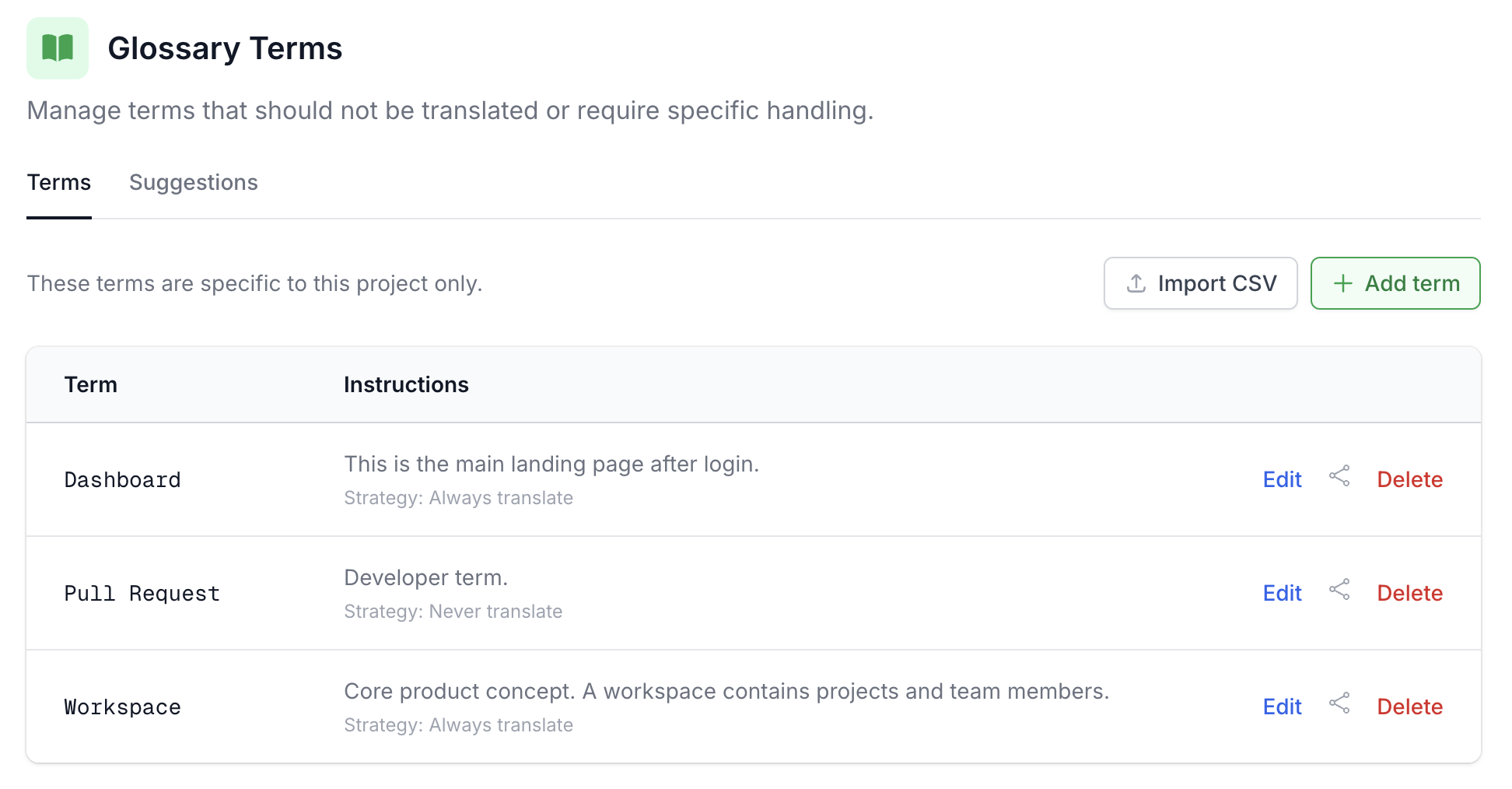
A short glossary and style guide. Not a 20-page document. Thought-through product terms and a few bullet points about tone and style is enough to keep both human and AI translations consistent. Better short and focused than verbose and covering every single edge case.
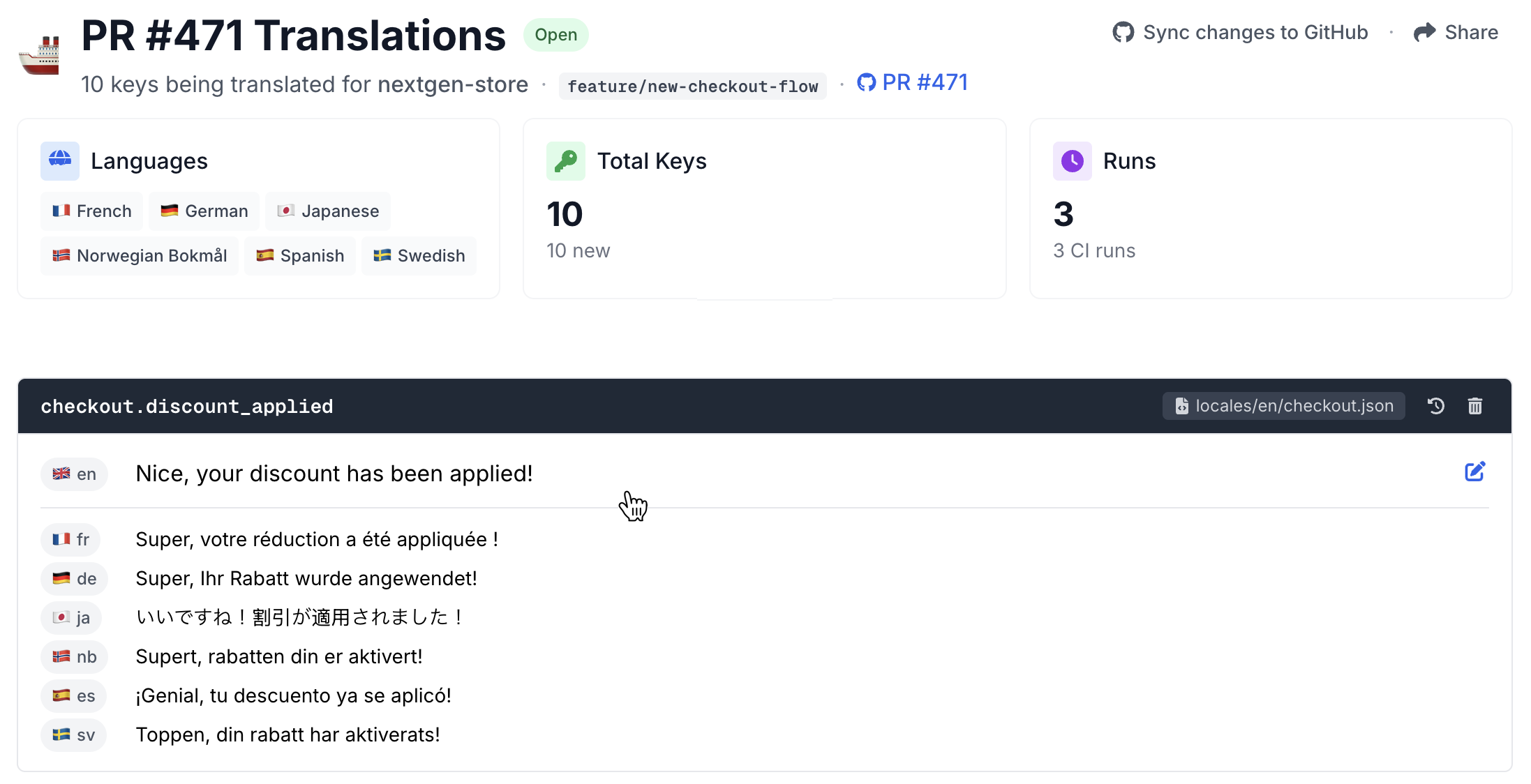
A lightweight review step. It should be easy to review and tweak translations when you want to, even for non-technical team members. Some teams want to do a quick review on all new strings, others quickly start to trust it and only check occasionally. For brand-sensitive surfaces like the pricing page or welcome emails, you might want a native speaker to check things without having to read JSON diffs.
That's the whole setup. No translator seats and no sync layer. For the GitHub Actions side of this, we've written up working examples in How to Automate i18n Translations with GitHub Actions.
Why this works in 2026 (and didn't in 2021)
This stack wasn't really viable a few years ago. A few things changed:
LLMs got good at translation. The base quality of AI translation has improved dramatically. For SaaS UI copy, with the right setup, the output is in my experience hard to tell apart from a competent human translator. Marketing and legal copy are different and still benefit from a human pass.
But the model is only part of the equation. A raw API call gets you a translation. A good translation requires glossary enforcement, style guide adherence, surrounding context, and consistency with what you've already shipped. The system around the model matters as much as the model itself.
Purpose-built tools now exist for this workflow. A few years ago, your options were a full TMS or building everything yourself. Now there are tools designed specifically for developer-driven translation workflows: CI integration, glossary and quality checks, review UIs for non-technical teammates, all without the overhead of a traditional TMS.
What it looks like at different stages
What you need depends less on revenue and more on how many languages you support, how much content you have, and how many people need to be involved.
A few languages, mostly product strings. Translation files in the repo, a CI action that fills in missing keys on PRs, a short glossary and style guide. This is the starting point for most teams, and for many it's all they ever need.
More languages, non-technical reviewers involved. Same stack, plus a review UI so a PM or a native speaker on the team can tweak a translation without opening a PR. Quality checks that flag missing placeholders and wrong plural forms start to matter here too.
Large content operation on top of the product. If you're also localizing a help center with hundreds of articles, weekly blog posts, or marketing pages in many languages, you may genuinely have a translator coordination problem. That's where a TMS can help alongside the CI-native stack. A lot of teams at this stage run both: automated for product strings, TMS for long-form content.
We've written more about the cost side in What SaaS Localization Actually Costs.
A starting point
If you want a minimum stack to try this week:
- Pick the translation file format your framework already uses. Don't switch formats to suit a tool.
- Write a short glossary and style guide. Three paragraphs on tone, twenty product terms, the formality rule per language.
- Wire up translation on pull requests. A GitHub Action calling the OpenAI API, or a dedicated service, or something in between.
- Add quality checks. Missing placeholders, plural mismatches, suspicious length.
- Give non-developers a way to tweak translations. A review UI, a Slack bot, anything that isn't
open a PR.
I've seen teams get this running in a week. And it doesn't lock you in. If the situation changes and you need a TMS later, the translation files are already in your repo and the migration is straightforward.
I'm building Localhero.ai for exactly this kind of setup. Translations on every PR, glossary and voice that learn over time, a review UI for when someone wants to tweak something without touching code. Try it free.
FAQ
Do I need a TMS to localize a SaaS product?
Not if your translatable content lives in code. A full classic TMS earns its place when you coordinate professional translators, manage translation memory across many products, or handle content that is not in your repo. For a product team whose strings sit in JSON, YAML or PO files, a CI step that translates changed keys on each pull request covers the translation itself with fewer moving parts and no sync step to forget. It does not replace the translator-facing workflow, which is the next question.
What do I lose by skipping a TMS?
Less than the word TMS
suggests. What you give up is the coordination layer built for managing external translators: assignment, deadlines, per-string comment threads, vendor management. Much of that exists to organise work that automation now does on its own. You keep a review UI: Localhero.ai has a dashboard with glossary enforcement, quality checks, and Save & align, which takes one edit you have made and regenerates the other languages to match it, for you to approve before anything is saved. The difference is that the files stay in your repo rather than moving into the platform. In that sense Localhero.ai is a lightweight TMS that lives in your pull requests: the glossary, review page and translation memory without a second system of record. If you employ or contract translators who live in a tool all day, that coordination layer is worth paying for.
How do I localize app strings without moving them to a platform?
Keep the locale files as the source of truth and automate against them in CI. On each pull request, diff the source locale against the base branch, translate the keys that are new or changed, and commit the results back to the same branch. Your translations stay in git, reviewable in the same diff as the code that introduced them, and there is no import or export step to keep in sync.
Is a git-based workflow a fit for a non-technical team?
More than the git-based
label suggests. On GitHub, the Localhero.ai GitHub App installs in one click, detects your framework and file layout, and opens a pull request containing the workflow and config. Nobody writes CI by hand. After that, reviewers edit translations in the dashboard without touching code or git, and those edits land back in the pull request. The parts that stay technical are merging that first PR and owning the repository it runs in. A hosted TMS with a web editor is the alternative worth comparing, particularly if your content lives outside the codebase.
Further reading
- How to pick a translation setup for your stack - a decision aid by stack and team shape
- The Best GitHub Actions for i18n Translation, Compared - tool-by-tool comparison across formats, delta translation, and review
- How to Localize Your SaaS With a Small Team - the small-team playbook
- What SaaS Localization Actually Costs - cost breakdowns at different stages
- Automate SaaS Localization in Your CI Pipeline - the CI side in more detail
- Translating JSON and YAML locale files in CI without a TMS - the working CI pattern, with code
- Translating your i18n files with Claude Code or Cursor - making coding agents translation-aware
- How to Localize Your Rails or React SaaS End-to-End - locale routing, emails, SEO, multi-tenancy