
How much does localization cost?
is one of those questions that can be pretty tricky to get a straight answer to. You quickly find the pricing pages for the TMS platforms and translation agencies, but what about everything else involved in starting a localization initiative for your product?
In this post I'll go through the different parts that a localization project actually entails, so you can get a better picture of the total cost, not just the obvious line items. With the right setup, most of these costs shrink.
Five places the money actually goes

1. Translation itself
Paying for strings to be translated, whether by AI, an agency, or a human translator. A typical SaaS product can have somewhere between 1,000 and 5,000 translatable strings. With AI translation, the per-string cost has dropped significantly, but it varies a lot depending on whether you're using a raw API, a dedicated service, or professional translators. Worth checking what's included: just the translation, or also glossary handling, quality checks, translation memory?
2. Tooling
The platform or service that manages the translation workflow. This can range from a free GitHub Action to an enterprise Translation Management System. The right level depends on how many languages you support, how many people are involved, and whether you need features like glossary enforcement, review workflows, or CI integration. More on this in Choosing the right tooling below.
3. Developer time
Wiring up i18n, maintaining locale files, fixing broken placeholders, handling locale routing, debugging edge cases. The initial setup, extracting hardcoded strings and configuring your framework, can take anywhere from a day to a couple of weeks depending on the stack. Of course, a lot of this can be handled alongside coding agents these days. We've written framework-specific guides for Rails and React. After that it's usually a few hours a month, but it adds up. If you've been hardcoding strings for a while, the refactor to i18n files is real work, and it tends to get harder the longer you wait.
4. Coordination
PM or founder hours spent chasing translations, answering context questions, reviewing output, and managing the process. This is the bucket teams most often underestimate. If translations happen manually or through a separate workflow, someone has to keep it moving. If they happen automatically as part of your CI pipeline, this cost drops a lot.
5. Hidden costs
The costs that don't show up on any invoice but can end up being the most expensive part. These get their own section below.
A vendor quoting $0.15/word
is only talking about bucket one. Six months in, when someone says localization cost us more than we expected,
it's usually because all five buckets were at play, not just the translation line on the invoice.
The hidden costs that don't make it onto the quote
These don't appear on vendor pricing pages or agency invoices, but they can end up costing more than the translation itself.
Blocked releases. Features that can't ship because translations aren't ready. If a feature waits a week for translations, the cost isn't the translator fee. It's a week of delayed impact.
Context switching. Every hey, can someone translate this?
in Slack pulls a person out of what they were doing. These interruptions add up, especially when multiple people across the team are involved in translation coordination.
Inconsistency debt. Dashboard
gets translated three different ways across the product over a year. As the product voice evolves, early translations start to feel off too. Fixing all of this later means finding every occurrence, picking canonical terms, updating, and QAing in multiple languages. A glossary and style guide from the start prevents most of it.
QA across languages. German text is often 30-35% longer than English and can break layouts. Date and number formats vary. Plural forms work differently. Each new language multiplies the surface area you need to test, and these bugs tend to show up in production rather than in development.
Choosing the right tooling
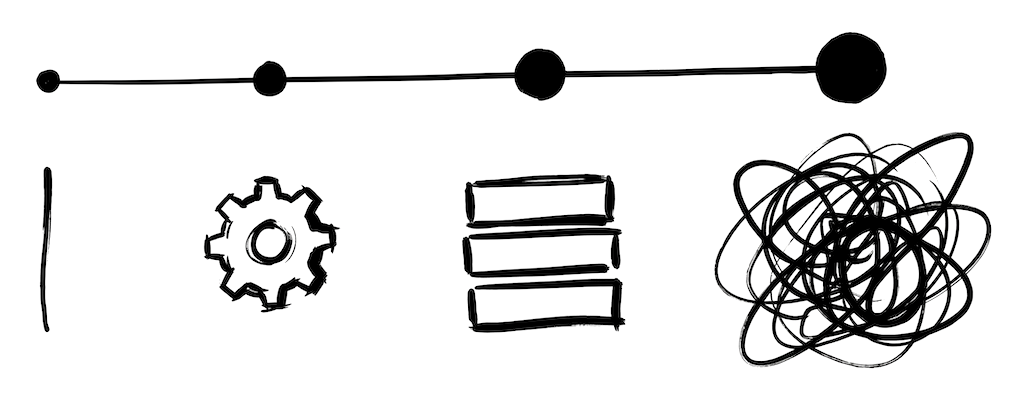
Most teams start somewhere on this spectrum and move along it as they grow:
Manual and ad-hoc. Someone asks in Slack, a colleague who speaks the language translates it, the strings end up in a spreadsheet or directly in the code. No tooling cost, but high coordination cost, and consistency tends to drift over time. This is how most teams start, and it works for a while. We've written about the typical SaaS translation workflow and why teams eventually outgrow it.
DIY with an LLM API. You write scripts that call OpenAI or similar, build glossary handling, wire up CI, handle quality checks. Low upfront cost, but the maintenance in developer hours tends to grow. We've written about this in Using the OpenAI API for App Translation.
A lightweight TMS for developers. Tools like Localhero.ai sit in the middle: CI-native translation on every PR, built-in glossary and style guide, quality checks, and a review UI for non-technical teammates. Localhero.ai, for example, runs from $29/month for smaller setups up to a few hundred for larger teams. The value here isn't cheaper translations, it's less developer time spent on coordination and fewer inconsistency bugs.
A full TMS. Lokalise, Phrase, Crowdin. Built for teams with dedicated translators, complex assignment workflows, and large content operations. To put numbers on it: Lokalise's cheapest paid plan (Explorer) is around $144/month, with the tiers most teams actually need (Growth, Advanced) landing at $499-999/month. Phrase splits into two products: Phrase Strings (their developer-focused UI localization tier) starts at $525/month, and the full Phrase TMS Team plan starts at $1,245/month. Crowdin falls in a similar range. Add the human coordination cost on top. This is the right choice when localization is big enough to be someone's or even a team's job.
A common pattern is teams over-investing in tooling early (an enterprise TMS before they need one) and under-investing at mid-stage (a DIY script that works
while eating engineer-hours in coordination). More on this in SaaS Localization Without a TMS.
Getting started
If you're planning your localization budget, try counting your current spend honestly, including developer hours and coordination. It's easy to underestimate. Figure out which bucket is costing you the most and look at that one first.
Things worth doing early:
Understand what your users actually need. Sit down with your team and figure out which markets matter and why, which languages your users are asking for, and what level of quality they expect. The scale of the effort depends a lot on these answers. Supporting two languages for a technical audience is a very different project from ten languages for a consumer product.
Get your tone of voice and glossary out of people's heads. It doesn't have to be a big production. Grab a coffee, go through your key product terms, talk about what gets translated and what stays in your source language, what level of formality feels right per language. The goal is to write down what's already in people's heads so it becomes reproducible, not just tribal knowledge. Even a short list of terms and a few bullet points on tone makes a real difference. We've written more about this in setting up style guides and glossaries.
You don't need to start with a 10x setup. Find something that automates the routine work so you can focus your time where it actually matters, and that grows with you as your product and team evolve.
If you're looking for a developer-focused SaaS localization tool built for how product teams actually work, I'm building Localhero.ai for exactly that. See how it works or check out the pricing.
FAQ
How much does it cost to localize a SaaS product? The translation line item is the part you can quote; it's rarely the part that costs most. A typical SaaS has 1,000 to 5,000 translatable strings. AI translation has pushed the per-string cost down far enough that for most teams it's no longer the dominant number. What fills the budget is the other four buckets: tooling, developer time to wire up and maintain i18n, the coordination hours somebody spends chasing translations, the hidden costs like blocked releases and inconsistency debt. A vendor quoting $0.15 per word is pricing one of five buckets.
Is AI translation cheaper than a translation agency? Per word, dramatically. Agency rates run around $0.10 to $0.25 per word with multi-day turnaround; AI translation is a small fraction of that. But per word is the wrong unit for this decision. It assumes the two produce the same thing. An agency gives you a human who understands context and can be held to a brief. AI gives you output in minutes on every pull request, which changes what's possible. You stop batching strings for a handoff. The teams that get the most out of the switch treat the savings as budget for review on the copy that actually matters, marketing pages and legal text, rather than pocketing all of it.
What are the hidden costs of localization?
Four that don't appear on any invoice. Blocked releases, where a feature waits a week on translations and the real cost is a week of delayed impact rather than the translator fee. Context switching, every can someone translate this?
in Slack pulling someone out of their work. Inconsistency debt, where Dashboard
ends up translated three ways over a year and fixing it later means finding every occurrence and re-QAing in every language. And QA across languages, since German text often runs 30-35% longer than English and breaks layouts, while plurals and date formats vary per locale. These compound, which is why the six-month this cost more than we expected
conversation is so common.
What does a translation management system cost compared to a CI-based tool? Real numbers, since this is where budgets get set. Lokalise's cheapest paid plan is around $144/month, with the Growth and Advanced tiers most teams actually land on running $499-999/month. Phrase splits in two: Phrase Strings starts at $525/month and full Phrase TMS Team at $1,245/month. Crowdin is in a similar range. Localhero.ai runs from $29/month for smaller setups up to a few hundred for larger teams, with a free tier of 250 credits a month on one project to try it on something real. The gap is mostly about what you're buying. A TMS pays for translator workbenches, assignment workflows and vendor management, which is real value if you employ translators and dead weight if you don't.
When is a TMS actually worth the money? When localization is someone's job. If you employ or contract translators who need a web workbench, translation memory, assignment and review stages and vendor management, a TMS is doing work a CI step genuinely does not replace. Buy one. The common mistake runs in both directions: teams over-invest early, buying an enterprise TMS before anyone is doing enterprise localization, then under-invest at mid-stage with a DIY script that technically works while quietly eating engineer hours. The thing a TMS costs you beyond the invoice is a second system of record, strings living both in the repo and in the platform, with somebody keeping them in sync.
How do we budget for localization without guessing? Count what you already spend before you price anything new, including the developer hours and the coordination time. Those are the numbers nobody writes down. Then find which of the five buckets is biggest and address that one, since it's usually not the one you were about to buy a tool for. Two things are worth doing early regardless of tooling. Work out which markets and languages actually matter to your users and what quality bar they need. Then get your tone of voice and key terminology written down while the list is short. Both cost an afternoon and both make every later decision cheaper.
Further reading
- How to Localize Your SaaS With a Small Team - the small-team playbook
- SaaS Localization Without a TMS - when you do and don't need a TMS
- Automate SaaS Localization in Your CI Pipeline - the CI setup that makes this work
- How to Localize Your Rails or React SaaS End-to-End - the full workflow beyond i18n basics
- Using the OpenAI API for App Translation - the true cost of the DIY path