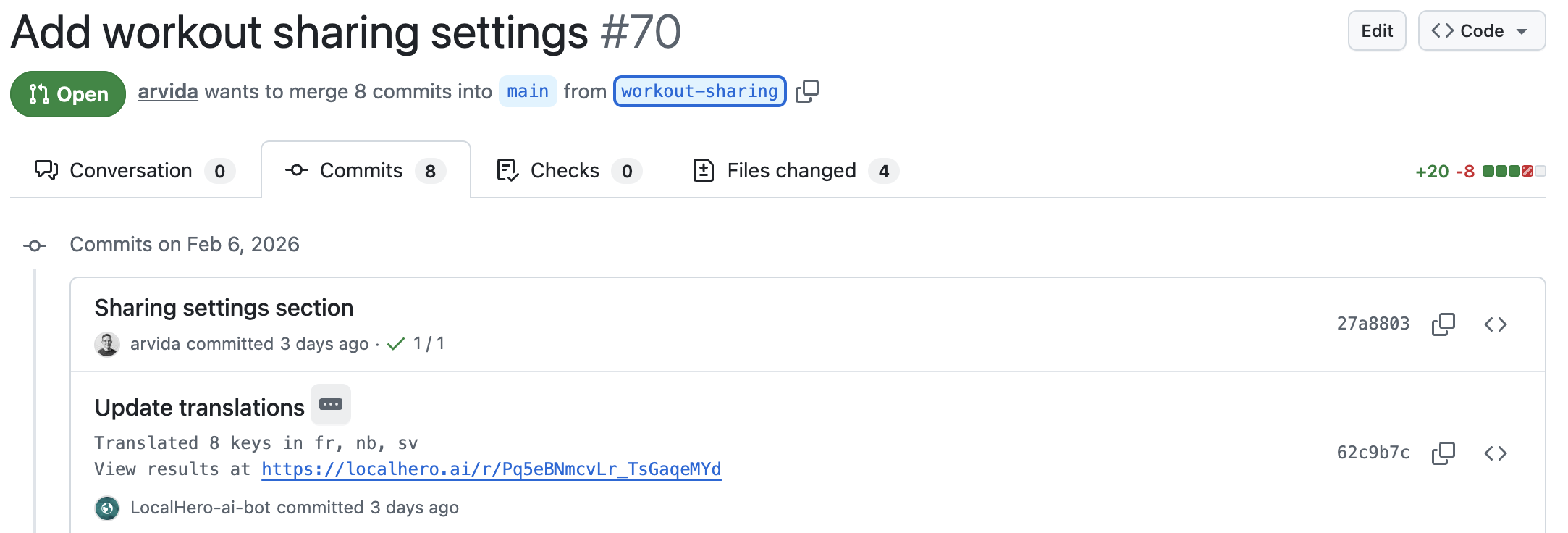
A pattern you've probably seen. Your AI coding agent finishes a new feature in 20 minutes, with the React components, the API routes, and the tests. Then the PR sits for two days waiting on translations. The feature is technically done. But it's not shippable, because the German, French, and Japanese copy is blank. Meanwhile, the person who owns translations is swamped.
An approach that tends to work: treat the agent as a smart contributor that gets the same translation context the rest of the team does, just spelled out more explicitly. Glossary, naming conventions, tone, where the locale files live. With that context, the agent writes correct source strings. A separate piece of the pipeline handles target translations automatically.
This post is about the agent side of that, Claude Code, Cursor, and Codex specifically. The CI side, translating the changed keys without a TMS, is its own thing we cover in Translating JSON and YAML locale files in CI. Here the focus is the context you hand the agent and the one place that keeps it current.
Why the gap exists in the first place
Agents are good at code. They're middling at translations once a project gets larger or has a specific voice.
A coding agent will happily generate UI strings in your source language. Where it tends to break down is consistency, product branding, and everything around the strings:
- Your glossary. Is it
Workspace
in German orArbeitsbereich
?Plan
orAbonnement
? The agent has no idea unless you tell it. - Your tone. Do you use
duorSiein German? Informal or formal Japanese? The agent will pick a tone that's probably fine but probably not yours. - Consistency with what you've shipped. The same string (
Save changes
) might already exist in five components, all translated identically. The agent's new string risks introducing a sixth, slightly different translation. - The translation step itself. Even if the agent writes the source strings perfectly, someone still has to translate them into your other languages.
A common workaround is to ask the agent to just translate everything to German too.
That can work, especially for a smaller code base. For a product team shipping continuously across multiple languages, the inconsistencies pile up fast. The fix isn't a smarter agent, it's a setup with clear rules and process so both agents and humans land in the same place. Less room for drift, less room for errors.
Splitting the work
One way to look at this is as three pieces of the same workflow:
- You and the agent handle source-language strings. Copy usually comes from a designer, PM, or you. The agent's job is the mechanical part: putting strings in the right file, picking a consistent key name, handling interpolation and pluralization, and not touching target-language files directly.
- A translation service handles target locales. It runs in CI on every PR, knows your glossary, learns from your translation memory, and produces consistent output across languages.
- Your team reviews what matters. Most routine UI strings can ship without ceremony. Brand-sensitive surfaces like pricing copy, error messages, and marketing are where a human pass earns its keep.
The agent skill at github.com/localheroai/agent-skill handles the first piece. Localhero.ai, which we are building, handles the middle and gives your team a workspace for setting up guidelines, reviewing, and adjusting strings. The pattern is general though: you can do it with a hand-rolled script calling OpenAI (or similar) and some GitHub Action setup. The specific tool matters less than getting the pieces right, the agent's context and a place for the team to review. A hand-rolled script works. But for most product teams, leaning on a tool built for it makes for a smoother just works
process and lets the team focus on the right tasks, not maintenance.
Making Claude Code translation-aware
Claude Code reads a few different things when it starts a session, like project memory in CLAUDE.md at the repo root, and skills in .claude/skills/. Both are good ways to instruct it, steer its behavior, and give context. I'd put project-wide rules in CLAUDE.md and translation-specific procedures in a skill, so the skill only loads when it's actually relevant.
For projects using Localhero.ai, the fastest way to give your agent the full picture is the installable skill at github.com/localheroai/agent-skill:
npx skills add localheroai/agent-skill
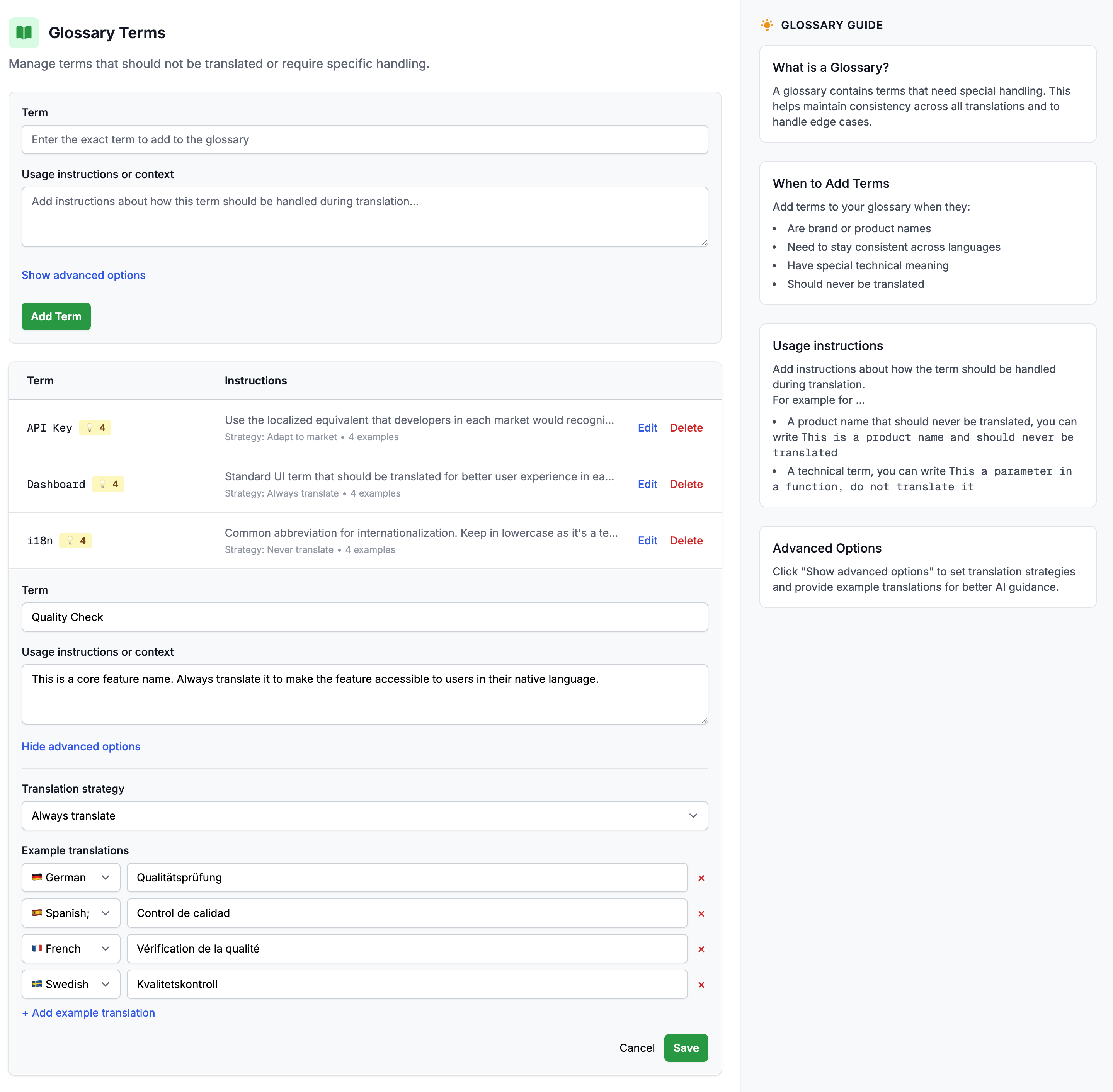
What the agent gets out of the box: your project's i18n conventions, plus automatically learns how to fetch the latest glossary and tone/style settings from your Localhero.ai project. If your team updates a term in the web UI (say Plan
becomes Abonnement
in German, or you tighten the formality on Japanese copy), the next time the agent writes a string it has the current version. Nothing to sync, nothing to remember. The central glossary and style guide stay the single source of truth, and the agent reads them the same way a new teammate would on day one.
The skill also checks whether your repo runs the Localhero.ai GitHub Action. If it does, the agent stops after writing source strings and lets CI handle target translations. If not, it runs npx @localheroai/cli translate --changed-only locally. That branch is the part that catches you out when you hand-roll a skill: the agent will sometimes translate locally when CI was going to do it anyway, and you end up with a PR where translations were generated twice with slight differences.
SKILL.md is an open standard adopted across Claude Code, Cursor, OpenAI Codex, Gemini CLI, and a growing list of other agents, so the same skill file works in all of them.
If you want to roll your own skill against a different translation pipeline, something like this could be a starting point:
---
name: my-i18n-skill
description: Translation rules for adding or modifying user-facing strings.
---

# Translation rules

- Source locale is `en`. Don't write to `de.yml` or `fr.yml` directly.
- Use `I18n.t` everywhere. No hardcoded strings.
- Key naming: nested by feature, snake_case (e.g. `users.profile.save_changes`).
- Tone: professional but approachable. Informal address (`du` in German,
  `tu` in French). See `style-guide.md` for examples.
Heads-up: a static skill like this gets you the conventions, not the live glossary. If your product terms or tone evolve, you'll either need to update the skill file by hand or rebuild the dynamic fetch yourself. That's the work the Localhero.ai skill is doing for you.
Cursor: same shape, different format
Cursor's current project-rules format is .cursor/rules/<name>.mdc, one file per rule, with YAML frontmatter that controls when the rule applies. (The older .cursorrules single-file format still works for legacy projects but isn't where new projects should start.)
A translation-rules file at .cursor/rules/translation.mdc might look like this:
---
description: Translation rules for adding or modifying user-facing strings
globs:
  - "**/locales/**/*.yml"
  - "**/locales/**/*.json"
  - "**/*.html.erb"
  - "**/*.jsx"
  - "**/*.tsx"
alwaysApply: false
---

# Translation rules

Source locale is `en`. Don't write strings in `de.yml` or `fr.yml` directly.
Use Rails `I18n.t` everywhere. No hardcoded strings in views or controllers.
Key naming: nested by feature, snake_case. Example: `users.profile.save_changes`.

After adding source keys: if `.github/workflows/` references
`localheroai/localhero-action`, commit and push, translations run on the PR
automatically. Otherwise run `npx @localheroai/cli translate --changed-only`.
The globs field tells Cursor to load this rule only when files matching the pattern are being edited, which keeps context size reasonable. Setting alwaysApply: true is also valid but tends to be overkill for narrow concerns like translation handling.
Cursor's @-commands let you reference files for context, so pointing the agent at your glossary (@glossary.yml) when working on UI copy tends to give better results than relying on the model's training-time guess at what Workspace
should be in German.
What this doesn't solve
Some things are worth being honest about:
- Long-form copy. Marketing pages, help center articles, legal copy. AI translation has gotten very good but professional translators still tend to do this better, and with the right review tools, verifying AI quality on long-form can be pretty smooth. Use AI for product UI. For long-form, keep humans in the loop when your brand voice matters, otherwise it slides into AI slop territory.
- Brand-sensitive surfaces. Welcome emails, pricing-page copy, error messages your customers will quote in support tickets. Review these in the beginning and adjust your setup as you see issues, until the glossary and tone settings catch most of what matters.
- Languages with low training data. Current frontier LLMs (GPT-5, Claude Sonnet 4.x) handle 50+ languages well and around 100 at a usable level. The output is surprisingly good in most cases, but quality drops off the further you go from the top tier of training data. Some Nordic minority languages, many African or Indigenous languages, and dialect variants still benefit from a native-speaker review even when the AI output looks fine on the surface.
- Context-sensitive strings.
Open
as a verb (open a file) vsOpen
as an adjective (the dialog is open). Glossary can help, but ambiguous keys are still ambiguous. Naming keys descriptively (actions.open_filevsstate.dialog_open) reduces this more than any tool can.
Tools can help with the ambiguity descriptive naming can't reach. Localhero.ai does quite a few things behind the scenes here and tries to be really smart, for example pulling in semantically and hierarchically related keys as context when translating, so the model sees how surrounding strings are translated instead of treating each key in isolation.
One thing that helps across all of these: LLMs have seen a lot of good product UI copy in their training data. Feeding the agent good examples of strings you like from your existing app tends to lift quality more than tweaking the prompt. Examples are a stronger signal than instructions, just ensure they are the right ones.
Agent-driven translation handles routine product strings well. Still, editorial work on the surfaces that matter most is good to keep in mind. And good input (clean, well-written source strings) makes for better output.
How this fits if you already have a TMS
If you have a dedicated localization team and a TMS, an agent-driven setup doesn't replace what you have. It runs alongside it. The agent handles the routine UI strings that would otherwise wait in a translator's queue. Your translators focus on long-form copy, brand-sensitive surfaces, and the languages that need careful human work. Less time spent on Save
and Cancel,
more time on the surfaces that actually need a translator's judgment.
Worth thinking about as a friction-reducer and unblocker, not a complete replacement.
What this looks like for a team
The shape that holds up is: a central place for the team to manage the work, with the agent and CI plugging into it. Automation keeps it moving without dropping consistency.
That's the gap Localhero.ai is built for: a lightweight TMS that lives in your pull requests, with on-brand AI translations on every PR. The glossary, tone, and style settings live in one place that designers, PMs, and engineers can all edit. The per-PR review UI lets non-technical teammates adjust translations without reading a YAML diff. Translation memory builds up across PRs, so the tenth feature you ship is more consistent than the first.
The agent handles the mechanical part of writing source strings well. The team handles the parts that matter. Translation stops being the thing nobody owns.
A working starting point: the agent skill at github.com/localheroai/agent-skill, plus the GitHub Action docs for the CI piece.
FAQ
Can Claude Code or Cursor translate my i18n files directly?
They can, and for a small codebase asking the agent to translate everything to German too
works fine. Where it breaks down on a real product is consistency: the agent has no memory of how you translated Workspace
last time, no view of your glossary, and no tone setting, so the tenth string drifts from the first. The pattern that holds up is to let the agent write clean source strings and key names, then hand target-language translation to a step that knows your glossary and translation memory. The agent does the mechanical part well; consistency across languages needs shared context it doesn't carry between sessions.
How do I give my coding agent my glossary and tone settings?
Put project-wide rules in CLAUDE.md (or .cursor/rules/*.mdc for Cursor) and translation-specific procedures in a skill so they load only when relevant. For a static setup you write the glossary and tone into the rule file by hand. The downside is it goes stale when your terms change. If you use Localhero.ai, the installable skill at github.com/localheroai/agent-skill fetches the current glossary and tone from your project at write time, so updating a term in the web UI reaches the agent on its next run with nothing to sync.
Does the same setup work across Claude Code, Cursor, and Codex?
Yes. SKILL.md is an open standard adopted across Claude Code, Cursor, OpenAI Codex, Gemini CLI, and a growing list of other agents, so one skill file works in all of them. Cursor also reads its own .cursor/rules/*.mdc format, and Claude Code reads CLAUDE.md, so you can mix a shared skill with editor-specific rules. Install once with npx skills add localheroai/agent-skill and the same conventions apply whichever agent a teammate happens to use.
What should the agent translate, and what should a human still review?
Let the agent and CI handle routine product UI: buttons, labels, settings, error states. Keep a human pass on brand-sensitive surfaces (pricing copy, welcome emails, anything customers quote back to support) and on long-form marketing or legal copy, where professional translators still do better. Low-resource languages and dialect variants also benefit from a native-speaker check even when the output looks fine. Naming keys descriptively (actions.open_file vs state.dialog_open) removes a lot of the ambiguity no tool can guess its way through.
Further reading
- Your Coding Agent Should Handle Translations Too - the broader case for agent-aware translation
- How to Automate i18n Translations with GitHub Actions - three working approaches, with config
- SaaS Localization Without a TMS - the code-native workflow this fits into
- Style guides and glossaries for translation consistency - how to write the glossary the agent reads