Docs menu
Quickstart
Localhero.ai is a lightweight TMS that lives in your pull requests. The GitHub Action and CLI translate new and changed keys on each PR, while the dashboard holds your glossary, style guide and review. Corrections from review go into translation memory and shape later translations. Here you will find info on project setup, how to use the CLI and GitHub Action, and video demos. Just reach out to hi@localhero.ai if you have any questions or need assistance!
Get started
1. Run the init command in your project directory
npx @localheroai/cli init
This guides you through setup: detecting your translation files, creating localhero.json, and optionally adding a GitHub Actions workflow. You'll need an API key from your account.
2. Choose your workflow
There are two ways to use Localhero.ai to handle your i18n translations:
Automatic (recommended)
During init, select "Yes" to add the workflow file. Then add your API key to GitHub Secrets (you'll get instructions from the command). Every PR with translation changes gets translated automatically.
or
Manual
Select "No" when asked to add the GitHub Action during init. Run commands manually as needed:
npx @localheroai/cli translateTranslates any keys missing translations and saves them to the API.
npx @localheroai/cli pullDownloads updated translations from the API to your local files.
How it works
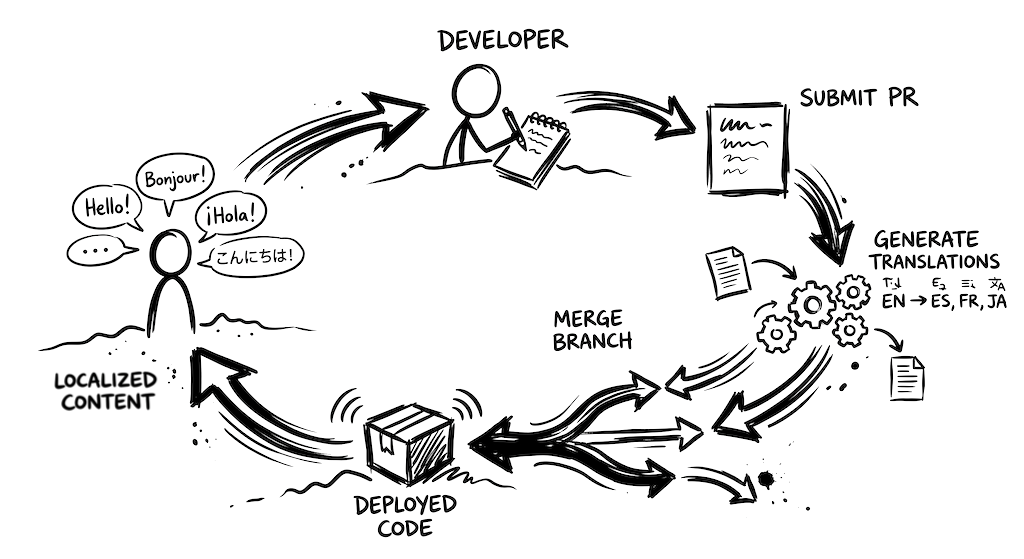
Set up once, and automatic translations become part of your normal workflow.
Configure your project
Create a project and specify which languages you support and where your translation files are. JSON, YAML, and .po files all work. Rails, React, Next.js, Django, Lingui, and others are supported out of the box.
Then define a style guide for your tone of voice and a glossary for terms that need special handling. These guide every translation, so your content sounds like your product, not like generic AI output.
Translations on autopilot
With the GitHub Action installed, translations happen automatically. When a PR adds new strings, they're detected, translated, and committed to your branch. Ready when you merge.
Prefer working locally? The CLI translates as you build.
Stored translations build context over time, so new translations stay consistent with what's already there.
Review and edit from the dashboard
All translations live in the dashboard, where anyone on your team can review and make changes. No code, no dev environment needed.
To get edits back into your codebase, click Export to GitHub in the top right of the translations page. This lets you pick which keys to include and creates a pull request with the changes. On PR-specific pages, use the Sync to GitHub button to push edits for that PR. Both require the GitHub App to be connected.
You can also run npx @localheroai/cli pull to download translations locally, or clone for build pipelines where translation files aren't in version control.
Quick demos
See Localhero.ai in action with these short walkthroughs.
Add automatic AI translations to your React app in 2 minutes
Building LocalHero using LocalHero
Let your whole team ship translation PRs
Easily quality check 3,000 translations
Next steps
Guides for your stack
Setup walkthroughs with real config for the frameworks we see most: Ruby on Rails, Django, Phoenix, React and LinguiJS. There is also a guide to running the CLI in any CI/CD pipeline, one on how translations land in the pull request, one on the review workflow for the humans with final say and one on the MCP server for changing copy from Claude and shipping it as a pull request.
To find out what is wrong with the locale files you already have, checking locale files covers the check command: missing keys, empty values, broken placeholders and orphans, offline and without an account.
Already have translations? Migrating an existing project covers what import keeps and what gets translated. For the other direction, removing keys and locales.
Last updated
Ready to try it?
Get setup in a couple of minutes. No credit card required.