
Most of what we build Localhero.ai for targets product team work. Buttons, settings labels, error messages, the kind of copy that lives in a code repo. Lately though, a couple of conversations have been about more marketing-adjacent copy, like landing pages, and how an automated localization workflow could work for that.
Different question, different shape of problem. It is an interesting one, and one that people tend not to trust LLMs fully to handle. We have been digging into a solution for it with one of the teams, who was running a smaller marketing site built in Next.js and about to expand into a couple of additional European languages. This post is a write-up of what the workflow ended up looking like, what worked, and a few things that surprised us. We are still early, this is one team, take it as a data point rather than a recipe.
What a marketing team is trying to solve
When a small team starts thinking about a second or third language for their marketing site, the questions can probably cluster around things like:
- Where does the source copy live, and how does it get into the translation step?
- Who actually translates, an agency, a freelancer, an AI, or some mix?
- Who reviews the translations before they go live, and what are they looking for?
- How do we keep our brand voice intact across languages while still sounding native in each one, not like translated English?
- How does this scale when we change the homepage twice a month?
Many teams usually do not have a dedicated localization manager. The same person who wrote the English copy ends up coordinating the translations, and they are also doing five other things. The workflow has to be light enough that one person can run it without it becoming their full-time job.
The setup we tested
The customer had a fairly typical small-team Next.js setup. App Router, extracted copy in JSON files under messages/, one file per locale (messages/en.json as the source). English was the source. They wanted a few European languages.
The workflow looks something like this:
- Copy stays in the repo as the source of truth.
messages/en.jsonis what the team edits. No second system to keep in sync. - AI does the first pass on every PR that touches the source file, with a prompt tuned for marketing copy, not UI strings (more on this below).
- New translations get reviewed in Localhero.ai.
- Any adjusted translations get committed back to the PR and ship when merged.
- Glossary and prior decisions are remembered across PRs, so the next time
Workspace
orTry free for 14 days
comes up, the translation is consistent without anyone having to re-decide.
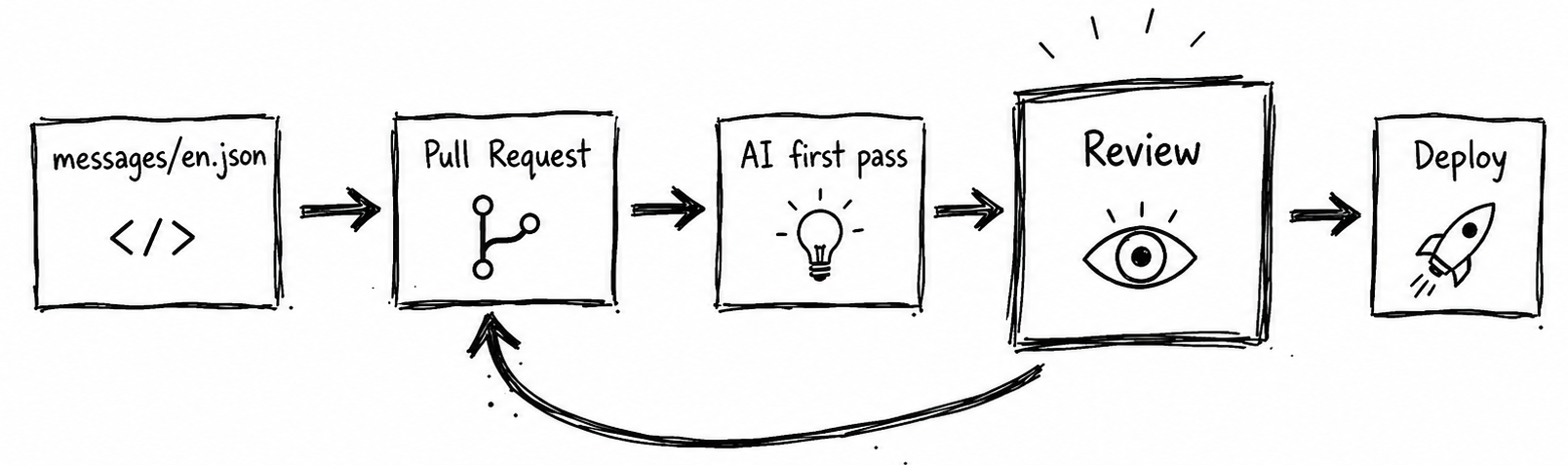
Nothing exotic on the surface. The interesting part is what we noticed once real marketing copy started running through it.
What we saw
Marketing copy and UI copy fail in different ways.
We had been pointing the same translation setup at both. Product strings came out fine. Marketing copy came out technically correct but a bit emotionally flat. One bad example that caught the eye: Ready to reclaim your focus?
came back in French as Prêt à reprendre le contrôle de votre concentration ?
— technically correct, but lands like a manual page, not a marketing line a native French copywriter would write. The fix was not a better model, it was a different prompt.
A surprisingly effective trick when writing this kind of prompt is to lean on the classics. Most of what a copywriter would do with marketing copy in 1965 still applies now, and naming a copywriting tradition in the prompt (Ogilvy, Schwartz, Bernbach, take your pick) changes how the model writes. It shifts the model into a more confident, less hedged register than another list of do-this-don't-do-that rules does. Giving it a lineage to imitate tends to beat giving it more rules to follow. Combine that with a handful of good examples of existing brand copy and the output starts moving in the right direction.
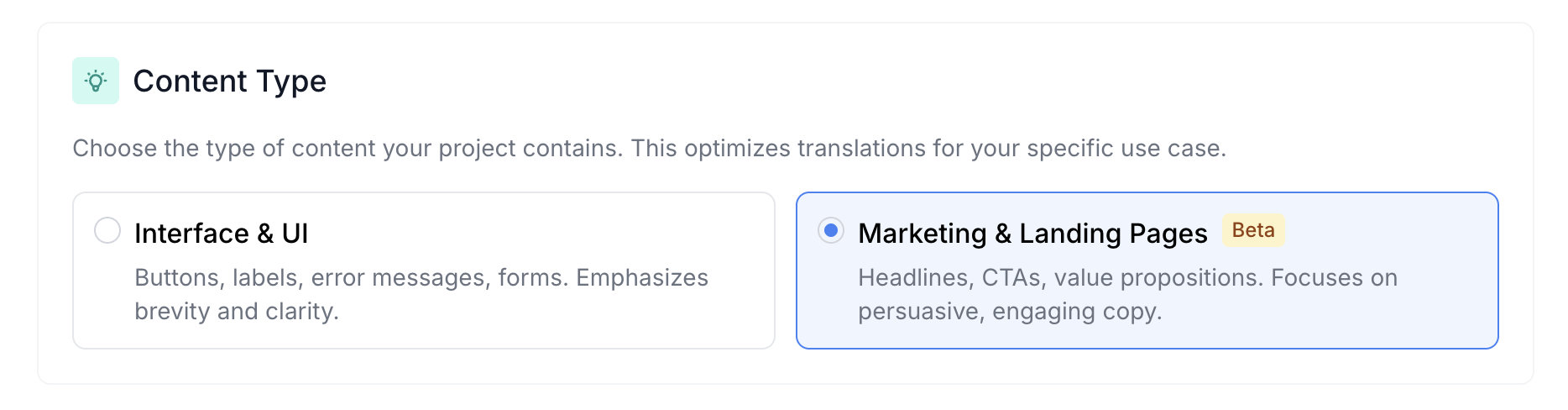
This is now a Beta setting in Localhero.ai called Content Type, with Interface & UI as the default and Marketing & Landing Pages as the other option. The whole feature is one radio button that swaps the prompt. We considered making it more clever but the radio button keeps producing better output than the clever versions we tried.
Brand voice needs more than a glossary.
A glossary handles vocabulary: Workspace
→ Arbeitsbereich,
Plan
→ Abonnement.
Voice is harder. Do you sound playful or serious in German? Do you address the reader as du or Sie? Active or passive? We started adding a short voice description to the project (conversational, direct, second person, slightly playful, never corporate
) and feeding it into the prompt. It works but takes a few iterations to dial in. We are still figuring out the right defaults.
The same string sometimes wants two different translations.
A Try free for 14 days
CTA on the pricing page and the same string in an onboarding email might want different translations. The first is conversion-shaped, the second is education-shaped. In UI work this almost never comes up. In marketing it comes up constantly. No perfect answer for this one yet. What works in practice: let the reviewer override, remember the override, accept that some strings translate context-by-context.
Keeping the prompt working over time
A prompt that works today often will not work in six months. Models change. Edge cases pile up. Without a feedback loop, the output drifts in whichever direction the latest model update pushes it.
For the marketing-content mode we keep a small evaluation set: a few dozen real marketing strings with human-rated reference translations. When we change the prompt, the eval scores the new output against the references on axes that matter for marketing copy: naturalness, brand voice match, length appropriateness, idiom handling, CTA strength. We use promptfoo to run it. The specific tool matters less than having any feedback loop at all.
A marketing team does not need to set this up themselves, we do it on our side. But it is worth knowing the work is happening, because the alternative is translation quality that quietly drifts and nobody notices until a customer points it out. We wrote about the general approach for product strings in How to evaluate AI translation quality, most of it carries over with a different rubric.
If you want to try this
If you are on Localhero.ai and want to try this, set up a project and switch the Content Type setting from Interface & UI to Marketing & Landing Pages (Beta). You can change it at any time. If your project mixes both kinds of copy, the pragmatic move today is one project per content type.
If you are a small team running a marketing site (Next.js, Astro, Nuxt, plain static, whichever) and want to be one of the teams we work with closely on this, email me. What helps most is here is what felt off, here is what we would have expected a native marketer to write.
That is what shaped most of what is in this post.
FAQ
How do I build a localization workflow for a small marketing team? Pick one source of truth for the copy (the repo if you have one, otherwise your CMS), one AI translation step with a marketing-tuned prompt, and one reviewer per language who knows the brand. Run it on every change rather than batching, so localized pages stay current. The biggest mistake we see is treating marketing translation as a one-time project. Marketing copy changes constantly; the workflow has to handle that.
How is transcreation different from translation?
Translation preserves the words. Transcreation preserves the intent. A translator asks what does this sentence mean,
a transcreator asks what would a copywriter in the target market write to land the same idea.
For marketing copy the second question almost always produces better output.
Can AI handle marketing translation, or do we still need a human? Modern AI handles the language part well, especially with a transcreation-oriented prompt. Where it needs help is brand voice, cultural references, and judgment calls. A workflow that works for small teams is AI for the first pass, a native-speaking reviewer for the pages that matter most (homepage, pricing, paid ads). Save the human review for where it earns its keep.
Does this work with Next.js out of the box?
Yes. Next.js with next-intl, next-i18next, or a hand-rolled JSON setup all work the same way. Source strings in messages/en.json (or wherever your source locale lives), Localhero.ai picks up changes on PRs and writes target locales into the same folder. The customer test in this post used App Router with JSON message files.
Do we need a TMS to do this? Not necessarily. A TMS is useful if you have a large team of translators coordinating across many projects. A small marketing team can usually get by with one workspace per project, a glossary, and a review step. We have written more about this in SaaS localization without a TMS.
What does this cost? The AI translation cost per page is small (cents to a few dollars per page per language depending on length). The real cost is reviewer time. For a small team, expect 15-30 minutes per page per language for a careful review, less for routine updates. That is meaningfully less than agency turnaround for the same work, but it is not zero.
Further reading
- How to evaluate AI translation quality: a practical guide for dev teams
- How to pick a translation setup and stack for your team
- SaaS localization without a TMS
Cover photo by Volodymyr Hryshchenko on Unsplash.