
TLDR: You can automate translations by triggering AI translations on every pull request with GitHub Actions. No more waiting on translations before shipping. This post walks through different approaches that work with your React, Rails, Next.js, and Django projects.
I've seen the same pattern at almost every team that ships a product in multiple languages. The feature is built, tests pass, the PR is ready to merge, but translations aren't done. Either the release gets delayed, or it goes out with missing strings in half the languages. Neither is great.
The root cause, in my experience, is that translations live outside the development workflow, even in projects where the translation files are checked into the codebase. They end up being managed through spreadsheets, Slack channels, or external platforms that aren't connected to your git flow. Every new feature requires someone to manually coordinate getting the translations done. And that someone is usually a developer who has better things to do.
The fix is straightforward: make translations part of your CI/CD pipeline. When a developer pushes code with new translation keys, translations should be generated automatically, just like tests run automatically.
Why GitHub Actions for translations?
GitHub Actions is the natural place to automate translations because it's already where your code lives. Instead of syncing files back and forth between your repo and an external platform like Lokalise or Phrase, translations happen right in the pull request workflow.
Here's what an automated translation workflow looks like:
- You add new translation keys in the source language
- A pull request is opened for the changes
- GitHub Action detects new or changed keys
- Translations are generated (via API call to a translation service)
- Translated files are committed back to the branch
- Reviewer sees both code changes and translations in the same PR
This means translations are always part of the code review process, always version-controlled, and always ready to ship with the feature. No waiting for someone to get back to you.

Approach 1: DIY with a LLM API
If you want full control, you can build a simple GitHub Action that calls the OpenAI API (or any LLM API) directly to translate your i18n files. It's a quick approach for smaller projects where you don't need to ensure brand voice consistency and similar. It can work well for getting started.
Here's a minimal example for a project using JSON translation files:
The translation script
// scripts/translate.js
const fs = require('fs');
const path = require('path');

const SOURCE_LOCALE = 'en';
const TARGET_LOCALES = ['sv', 'de', 'fr', 'es'];
const LOCALES_DIR = './locales';

async function translateWithOpenAI(texts, targetLang, apiKey) {
  const response = await fetch('https://api.openai.com/v1/chat/completions', {
    method: 'POST',
    headers: {
      'Content-Type': 'application/json',
      'Authorization': `Bearer ${apiKey}`
    },
    body: JSON.stringify({
      model: 'gpt-4o',
      messages: [
        {
          role: 'system',
          content: `You are a professional translator. Translate the following JSON values from English to ${targetLang}. Keep the JSON keys unchanged. Only return valid JSON, no explanation.`
        },
        {
          role: 'user',
          content: JSON.stringify(texts)
        }
      ],
      temperature: 0.3
    })
  });

  const data = await response.json();
  return JSON.parse(data.choices[0].message.content);
}

async function main() {
  const apiKey = process.env.OPENAI_API_KEY;
  const sourceFile = path.join(LOCALES_DIR, `${SOURCE_LOCALE}.json`);
  const sourceTexts = JSON.parse(fs.readFileSync(sourceFile, 'utf8'));

  for (const locale of TARGET_LOCALES) {
    const targetFile = path.join(LOCALES_DIR, `${locale}.json`);
    const existing = fs.existsSync(targetFile)
      ? JSON.parse(fs.readFileSync(targetFile, 'utf8'))
      : {};

    const missing = {};
    for (const [key, value] of Object.entries(sourceTexts)) {
      if (!existing[key]) {
        missing[key] = value;
      }
    }

    if (Object.keys(missing).length === 0) {
      console.log(`${locale}: all keys present, skipping`);
      continue;
    }

    console.log(`${locale}: translating ${Object.keys(missing).length} keys...`);
    const translated = await translateWithOpenAI(missing, locale, apiKey);
    const merged = { ...existing, ...translated };

    fs.writeFileSync(targetFile, JSON.stringify(merged, null, 2) + '\n');
    console.log(`${locale}: done`);
  }
}

main().catch(console.error);
The GitHub Action workflow
# .github/workflows/translate.yml
name: Auto-translate i18n
on:
  pull_request:
    paths:
      - 'locales/en.json'

jobs:
  translate:
    runs-on: ubuntu-latest
    permissions:
      contents: write
    steps:
      - uses: actions/checkout@v4
        with:
          ref: ${{ github.head_ref }}

      - uses: actions/setup-node@v4
        with:
          node-version: 20

      - name: Translate missing keys
        env:
          OPENAI_API_KEY: ${{ secrets.OPENAI_API_KEY }}
        run: node scripts/translate.js

      - name: Commit translations
        run: |
          git config user.name "github-actions[bot]"
          git config user.email "github-actions[bot]@users.noreply.github.com"
          git add locales/
          git diff --cached --quiet || git commit -m "Auto-translate: update i18n files"
          git push
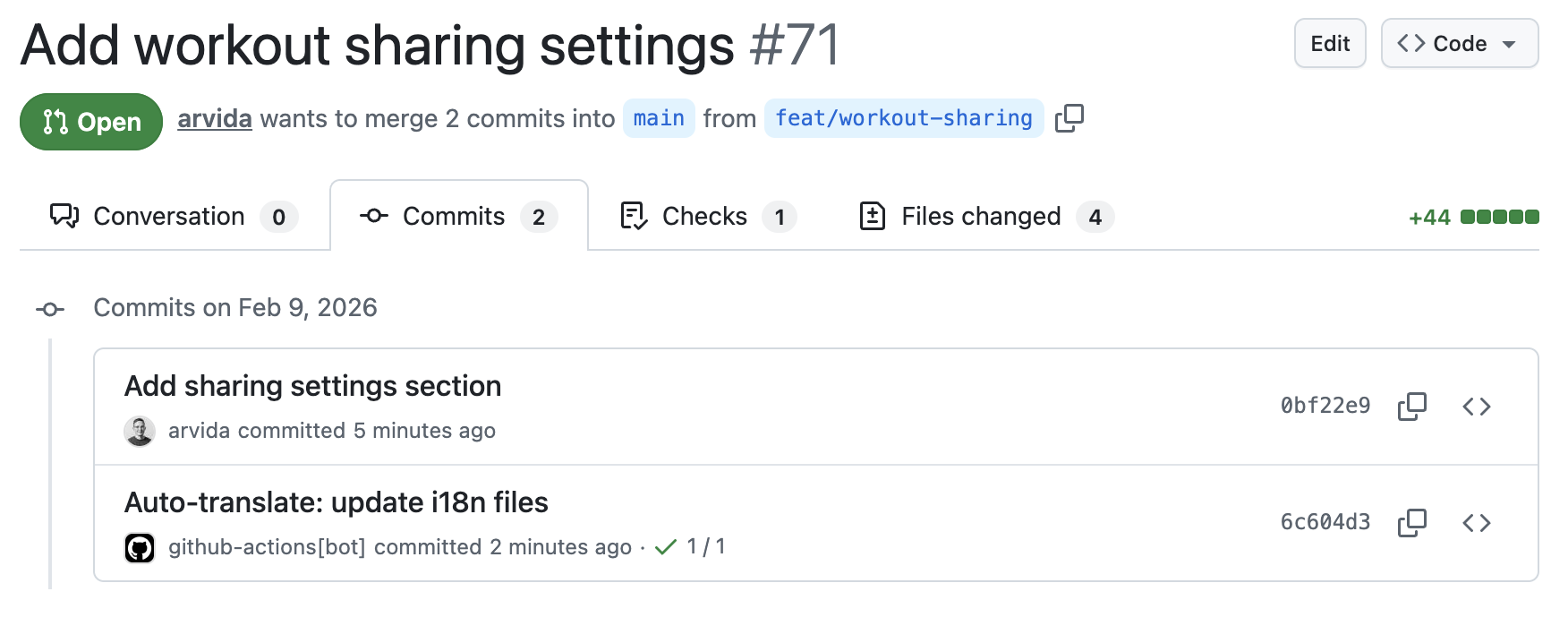
Pros: Full control, no external dependencies, cheap (just OpenAI API costs).
Cons: No brand voice management, no glossary support, no quality controls, no context awareness, no UI for managing translations, and you have to maintain the script yourself. For a side project, that's fine. For a production app with 10 languages, it gets old fast.
Approach 2: Using a translation management tool
The DIY approach works for simple projects, but it starts to break down when you need consistent terminology, brand voice, or you're dealing with complex file formats (nested YAML, pluralization rules, ICU messages). This is where dedicated translation tools come in.
The established players in this space, Lokalise, Phrase, Crowdin, and Transifex, were built when translations meant coordinating human translators. They're basically project management tools for localization: you sync files to their platform, assign work to translators, manage review workflows, and sync the finished translations back. That model makes sense if you have a dedicated localization team and professional translators. But for modern product teams where developers drive the workflow, it's a lot of infrastructure for a problem that doesn't need to be that complicated. (We cover how to choose between these approaches in a separate post.)
Tools like Localhero.ai (disclosure: I built this) are a lighter kind of TMS that lives in your pull requests. The approach is to automate as much as possible with AI and build good tooling for the rest. A CLI plugs directly into your GitHub Actions workflow so translations happen in the PR automatically, and a web-based UI gives you glossary management, style guides, quality checks, and a review interface for when you need to tweak things by hand.
Here's what the setup looks like using the Localhero.ai GitHub Action:
# .github/workflows/localhero-translate.yml
name: Translate with Localhero.ai

on:
  pull_request:
    paths:
      - 'locales/**'
      - 'localhero.json'

jobs:
  translate:
    runs-on: ubuntu-latest
    steps:
      - uses: actions/checkout@v4
        with:
          persist-credentials: false

      - uses: localheroai/localhero-action@v1
        with:
          api-key: ${{ secrets.LOCALHERO_API_KEY }}
The action handles fetching the base branch for comparison, translating missing keys, and committing changes back to the PR. It also skips automatically for draft PRs, bot commits, and PRs with a skip-translation label.
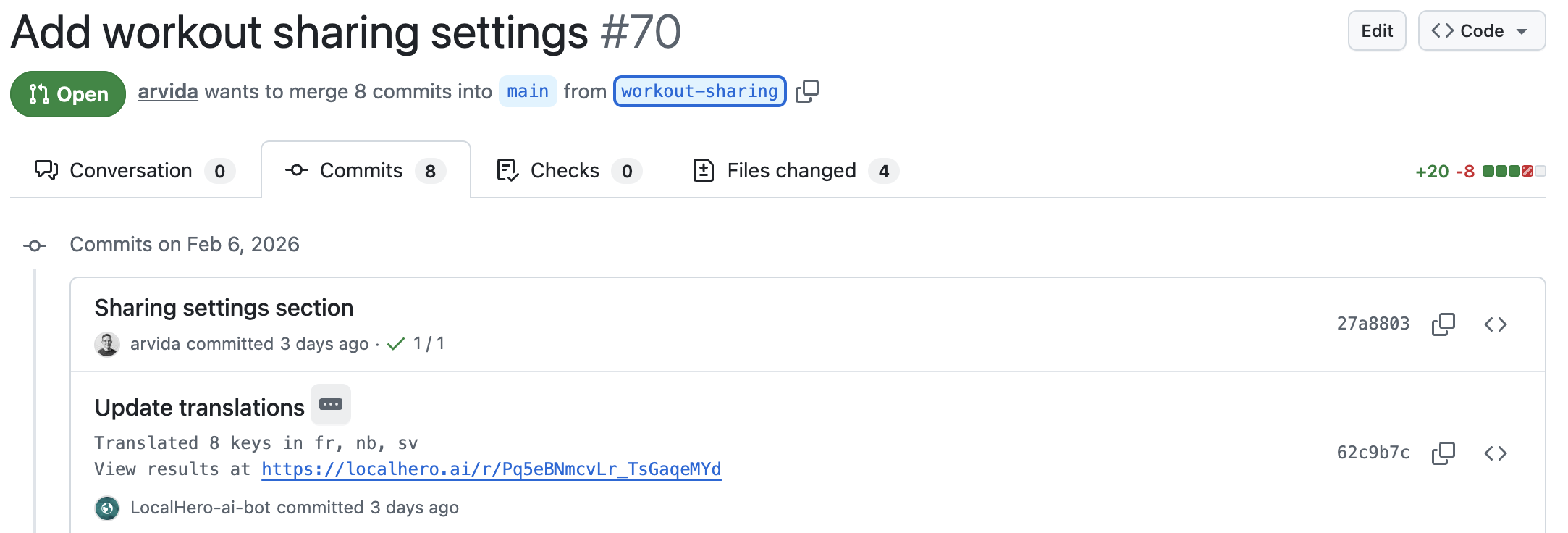 The translations committed to the PR on GitHub
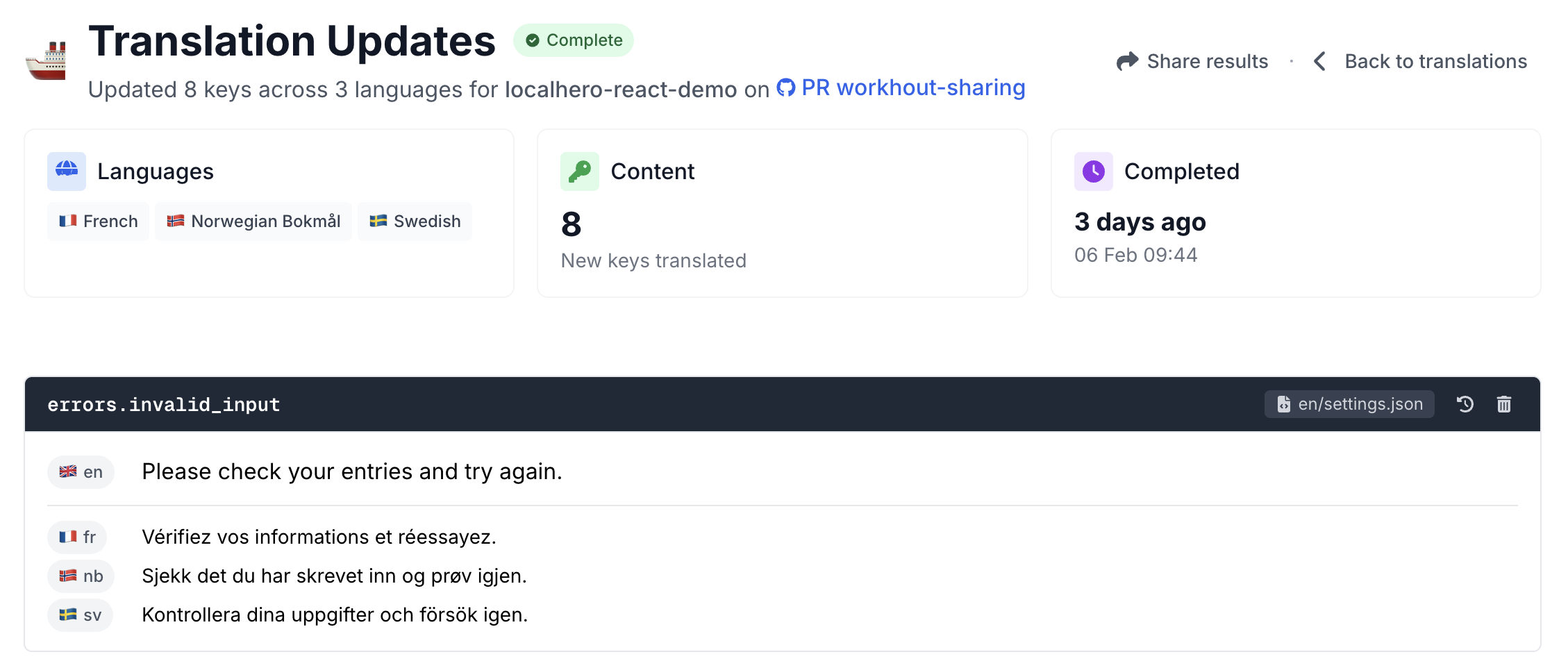 The same translations on Localhero.ai, where you can review and edit
The difference from the DIY approach is that the translation service maintains your style guides and glossaries, so checkout
always gets translated consistently across every PR, and your brand voice stays consistent as your team grows. You also get a review view where you can review and edit translations, then push changes back to the PR without touching git. Handy when someone on the team who doesn't live in the terminal wants to tweak a translation before it ships.
Approach 3: Self-hosted open source
If you need to keep everything on your own infrastructure, maybe for data residency requirements, regulatory compliance, or because your content is sensitive, self-hosting the translation platform is an option. This means running your own service that manages glossaries, style guides, and review workflows, while still plugging into GitHub Actions the same way as the other approaches.
You don't have to self-host the AI models too. Most self-hosted setups still call commercial LLM APIs (OpenAI, Anthropic, etc.) for the actual translations, you just control where the platform data lives. If even the API calls are a concern, tools like LibreTranslate let you run translation models fully locally, but the quality trade-off is real, especially for less common language pairs.
The main cost here is setup and maintenance. You're running infrastructure, keeping it updated, and building the tooling that managed services give you out of the box. I think this approach makes the most sense when data control is a hard requirement, not just a preference.
Choosing the right approach
This table compares the three approaches. If you're past that and comparing specific tools, we keep a separate comparison of the GitHub Actions and hosted tools that translate i18n files.
| Factor | DIY (LLM API) | Dedicated tool | Self-hosted |
|---|---|---|---|
| Setup time | 1-2 hours | 5 minutes | 2-4 hours |
| Translation quality | Good for simple text | Better (context + glossaries) | Depends on setup |
| Brand consistency | Manual effort | Built-in (style guides) | Depends on your tooling |
| Cost | LLM API costs (cents per PR) | From $29/month | Infrastructure + API costs |
| Maintenance | You maintain the script | Managed | You maintain everything |
| Best for | Side projects, MVPs | Production teams | Strict data requirements |
Quick decision guide:
- Must your data stay on your own infrastructure? → Self-hosted is your path. You can still use commercial LLM APIs for quality, but you'll own the platform setup and maintenance.
- Is this a side project or MVP? → The DIY script works, but also check if your tool of choice has a free tier. Localhero.ai for example has a free plan with 250 credits (~4,000 words) per month, which covers most side projects.
- Shipping a production app to multiple languages? → A dedicated translation tool saves you from maintaining translation scripts, keeps terminology consistent as you scale, and usually gives you a web UI where the whole team can review and edit translations.
Tips for better automated translations
Regardless of which approach you choose, these practices improve translation quality. I've found them to be consistently useful across different project sizes.
Use descriptive, hierarchical translation keys
Keys like btn.submit don't give the translator (human or AI) enough context. Use hierarchical keys that scope translations clearly. checkout.submit_order_button tells you exactly where in the app this string lives and what it does. A key like settings.notifications.email_digest_label is better than notif_email because the hierarchy provides context that the translator can use. This one change can noticeably improve translation quality, especially with AI translators that use the key name as a signal.
Only translate what changed
Focus your automation on keys that were added or modified in the current PR, not all missing keys across the project. The DIY script above does this by checking for missing keys. This keeps PRs focused and avoids churning translations that might be in progress elsewhere.
Review translations in staging
One benefit of PR-based translation workflows is that translations deploy to your staging environment along with the feature. You can see how translated text looks in the actual UI before merging, catching layout issues, text overflow, and awkward phrasing. In my experience, seeing the translation in context catches things that reviewing raw translation files never would. (For more on catching quality issues, see translation quality at scale.)
Maintain a glossary of product terms
Whether you manage it in a JSON file, a spreadsheet, or a tool's glossary feature, having a single source of truth for how your product terms translate prevents inconsistencies like workspace
being translated three different ways across your app. We have a separate post on setting up style guides and glossaries if you want to go deeper.
Don't block on perfection
AI translation quality with good context typically gets you 90-95% accuracy for product copy. Ship it, then iterate based on user feedback. Your users care more about having features in their language than perfect phrasing in every edge case. For me, this was a mindset shift, but it's the right one.
Framework-specific setup notes
The GitHub Action setup is the same across frameworks, you just point the paths trigger at your translation files:
- React (react-i18next):
public/locales/{lang}/translation.jsonorsrc/locales/{lang}.json - Next.js (next-intl or next-i18next):
messages/{lang}.jsonorpublic/locales/{lang}/ - Ruby on Rails (Rails I18n):
config/locales/{lang}.yml(you'll need a YAML parser that handles nested keys and pluralization) - Django (gettext):
locale/{lang}/LC_MESSAGES/*.po(more involved, you need to extract messages withmakemessagesfirst to know which keys were added, then parse and generate PO files)
FAQ
Is AI translation good enough for production? For product UI copy (buttons, labels, error messages, onboarding flows), yes. Modern LLMs with good context and style guides consistently produce usable translations. Marketing copy and legal text still benefit from human review, but for the bulk of your app strings, AI translation gets you there. Teams ship to many languages daily this way without issues.
How much does automated translation cost? The DIY approach using a commercial LLM API works out to cents per PR for most projects, a few dollars at most for a full run of a large app. The exact cost depends on which model you use, cheaper models like GPT-4o-mini cost a fraction of a cent per 1,000 tokens. Dedicated tools like Localhero.ai start at $29/month. Compare that to agency translation at $0.10-0.25 per word with multi-day turnaround, and the economics are pretty clear.
Can I use GitHub Actions with YAML or PO translation files? Yes. The GitHub Action trigger works with any file path: YAML, JSON, PO, XLIFF, whatever your framework uses. The difference is in the translation script. JSON is straightforward to parse, YAML needs a library that handles nesting and pluralization, and PO files need a proper gettext parser. Dedicated translation tools typically handle all these formats out of the box.
What's the difference between a translation management platform and CI-based translation? Translation management platforms like Lokalise, Phrase, and Crowdin were built to coordinate human translators. They give you a web UI where translators work on strings, with assignment workflows, review stages, and collaboration features. CI-based translation (what this post covers) keeps everything in your git workflow: AI generates translations automatically in PRs with no separate platform to manage. The platform approach still makes sense if you have a dedicated localization team working with professional translators. The CI approach is a better fit for product teams where developers drive the workflow and AI handles the bulk of translation work.
Do I still need human translators? For product UI strings, mostly no. For marketing pages or anything with cultural nuance, having a native speaker review the output is still worth it. The shift is that human review becomes an occasional quality check, not the bottleneck that blocks every release.
Should translations auto-merge or require approval? For most teams, auto-commit to the PR branch plus a staging review works well. Translations land in the PR automatically, your team reviews them in context on staging, and you catch issues before production. For marketing copy or anything brand-sensitive, you might want to require an explicit approval step before merging. The beauty of the PR-based approach is that you get this review workflow for free, it's just part of the normal code review process.
Further reading
On the Localhero.ai blog:
- The best GitHub Actions for i18n translation, compared: the tool-by-tool comparison, covering open-source actions, hosted services, and TMS integrations
- Translating JSON and YAML locale files in CI without a TMS: the working CI pattern, with code examples for key diffing, placeholder preservation, and validation
- Translating your i18n files with Claude Code or Cursor: making AI coding agents translation-aware
- How to pick a translation setup for your stack: decision aid by stack and team shape
- Setting Up Your Translation Process: choosing between in-house, agency, and automated approaches
- Translation Quality at Scale: how to check and maintain quality across thousands of translations
- Setting Up Style Guides & Glossaries: getting consistent brand voice in automated translations
External resources:
- GitHub Actions documentation
- OpenAI API reference
- react-i18next docs
- next-intl docs
- Rails I18n guide
- Django i18n documentation
Summary
Automating translations with GitHub Actions removes the coordination overhead that slows down international product teams. Whether you build a simple script, use a dedicated tool, or self-host, the key insight is the same: translations should be part of your CI/CD pipeline, not a separate process that blocks releases.
The fastest way to get started is picking whichever approach matches your current needs, setting it up on one project, and iterating from there. You don't need the perfect setup on day one. You just need translations to stop blocking your releases.
If you are weighing this against a TMS or an agent doing it ad hoc, the translation automation FAQ answers those directly, including how to sync translations with CI/CD pipelines.