
Most teams that pick the wrong translation tool don't pick a bad tool, they pick before they know what they're solving for and what the team really needs. A TMS that's overkill for the team size. A hand-rolled OpenAI script that quietly eats engineering hours. A SaaS service that doesn't actually fit the stack. Different issues, many times the same root cause.
So this is a decision aid more than a comparison. Find the situation that looks like yours below, use it to narrow down where to start, and ignore the rest.
(If you're hacking on a side project and just want AI translation cheaply, skip the rest of this post. Run a script that hits the OpenAI or Claude API, hardcode your glossary in a comment, commit the output. Come back when the side project turns into something, or try our free plan.)
What you're actually choosing between
Translation tooling for SaaS today usually falls into one of four buckets:
- Manual and ad-hoc. No tool. Someone asks in Slack, a colleague translates, strings end up in a spreadsheet or hardcoded. This is how most teams start.
- DIY with an LLM API. A homegrown script that calls OpenAI, Claude, or similar. You build glossary handling, CI integration, and quality checks yourself.
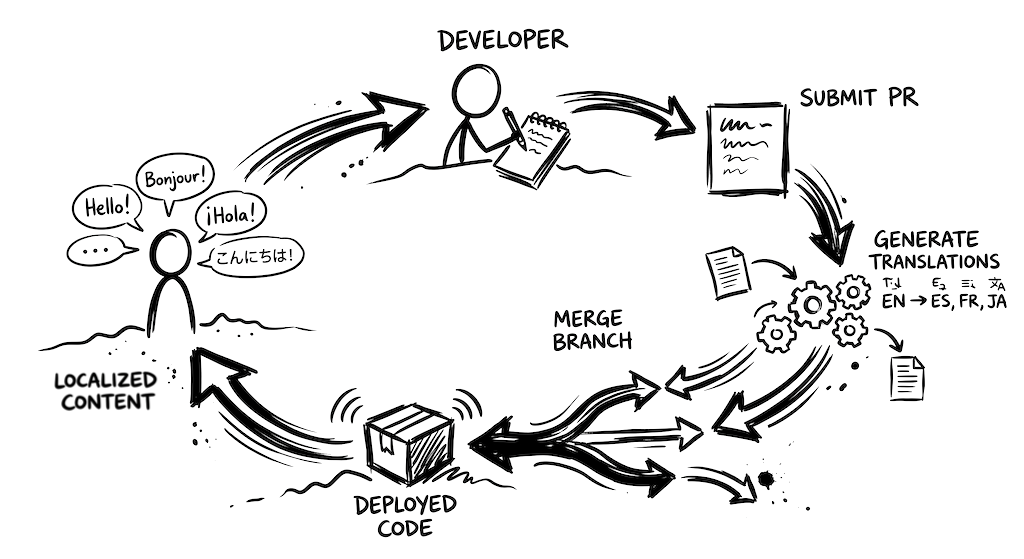
- A lightweight TMS. CI automation, glossary and style guide built in, a review UI for non-technical teammates. These tools split on where your translations live. Localhero.ai (which we are building) is the code-native kind: it lives in your pull requests. New keys get translated on the PR's own branch. Review edits go back to the same PR. Tolgee (open source, with a hosted tier and in-context editing) and SimpleLocalize (a low entry price) keep translations in their own store and sync them with your repo through a CLI or a separate PR.
- A full Translation Management System. Lokalise, Phrase, Crowdin, Transifex. Built for teams with dedicated translators and assignment workflows. Strong project-management features around human translation.
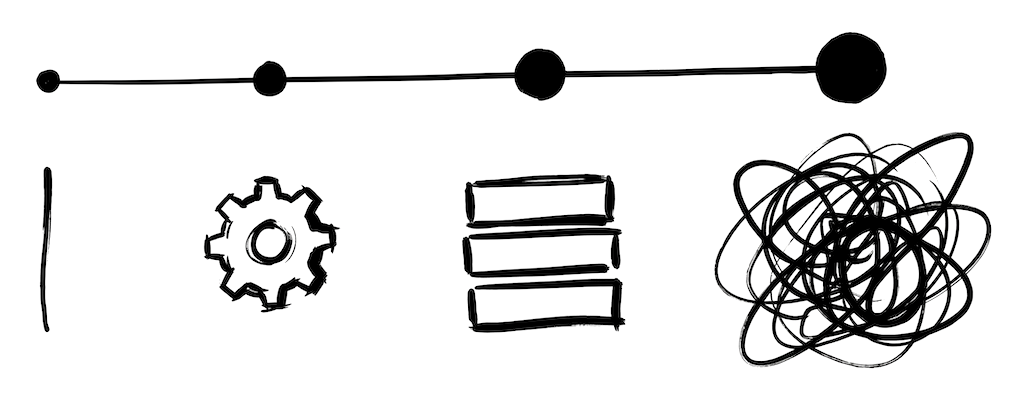
A lot of teams over-invest in tooling early (a full TMS before they need one) or under-invest at mid-stage (a DIY script that works
while quietly eating engineering hours). The tooling spectrum and what each one actually costs is its own post. This one is about which fits your situation.
Find your situation
Small Rails app, English-first, want to add 1-3 languages
You've got config/locales/en.yml, maybe a few hardcoded strings still lying around, and you want German and French in the product without spending a sprint on it.
What you can reach for to get started:
- Rails' built-in
I18nis already there. If you haven't already, this is the moment to extract any hardcoded strings into the locale files. The Rails localization guide walks through the basics. - For translation itself, a CI step that fills in missing keys on PRs covers most of the work. You don't need a separate TMS for a few languages of product strings.
- Add a short glossary file so product terms (
Subscription
vsPlan
vsMembership
) stay consistent across both AI and human translations.
Don't sign up for an enterprise TMS at this stage. A TMS Growth/Team tier sits around $500/month and is built for coordinating translator workflows you don't have yet. A developer-focused tool with PR-based translation starts around $29/month and skips the setup work entirely.
DIY can also work here, especially if you already have a glob of internal scripts. The trade-off is maintenance: you'll spend engineering hours on glossary enforcement, retries, key diffing, and edge cases as the surface grows. We've written about that trade-off in Using the OpenAI API for app translation.
For this situation: a developer-focused tool like Localhero.ai, Tolgee, or SimpleLocalize. Skip the TMS, skip the DIY script unless you genuinely enjoy maintaining it.
Next.js or React app, multi-locale routing already wired up
You probably already have react-i18next or next-intl set up, with JSON files per locale in the repo. The bottleneck isn't usually i18n configuration at this point, it's keeping translations current as features ship.
The shape of the problem matters more than the framework here:
- If you're shipping features weekly and your locale JSON files keep drifting behind English, you need automation in CI. PR-based translation lets you build in English and have translations land in the same PR before merge. The GitHub Actions automation post walks through three working approaches.
- If you mainly add new strings in bursts (new feature launches, marketing pushes), an on-demand sync from a TMS can work, but only if someone is reliably available to run it.
If your team is fully agent-powered (Claude Code, Cursor, Codex), the gap between feature-merged and feature-translated is the part worth fixing first. See making your coding agent translation-aware for the angle.
For this situation: a developer-focused tool with a CI-native workflow, such as Localhero.ai, Tolgee, or SimpleLocalize. A TMS adds coordination overhead you don't need at this scale.
Monorepo with multiple apps, different frameworks, shared glossary
This is the trickiest situation. Teams might have a Rails backend, a Next.js storefront, and a React Native app, all needing to align on tone and brand voice across languages.
A few things you'll usually run into at this scale:
- A central glossary becomes load-bearing. Without it,
checkout
ends up with three different translations across surfaces and the brand starts to feel inconsistent. - A TMS is one way to solve this (it's literally what they were built for). But it forces every app's strings into a separate sync layer and another system of record.
- A code-native setup with a shared glossary works too, especially if you don't need per-translator assignment workflows. The glossary lives in one place (a YAML file in the monorepo, or in the translation service), and every app references it.
If most of your content is product strings and you have engineers who like control, a code-native setup ages better here. If you have a dedicated localization manager and contracted translators, a TMS gives them a proper working environment and the monorepo complexity is worth it.
For this situation: a code-native tool with a shared glossary across apps. Localhero.ai supports multiple translation file paths under one project so a single glossary covers them all. A TMS only earns the added complexity if you're already translator-driven.
We have a dedicated localization team, or mostly long-form content
If localization is someone's actual main job, or your bulk of content is docs, help center, marketing, and legal copy in many languages, the math is different. This is where a TMS earns its keep.
- A TMS gives your translators a proper environment: translation memory, concordance search, QA checks, comment threads, the ability to leave context. AI translation can complement that (machine pre-translation that humans review), but the TMS is the system of record.
- Lokalise tends to be the default choice; Phrase is the more enterprise-leaning option; Crowdin lands in between. Pricing is real money at this tier (Lokalise Growth $499/mo, Advanced $999/mo; Phrase Strings $525/mo, the full TMS Team plan $1,245/mo), but coordination time saved tends to pay it back.
- Long-form copy benefits from professional translators in ways short UI strings often don't, especially for marketing and legal. Even teams I know who use a code-native setup for product strings keep their long-form content separate, usually in a TMS or working directly with an agency.
The mistake is buying a TMS before you're in this situation. The mistake going the other way is trying to force a code-native setup on a team that's actually translator-driven.
For this situation: a classic TMS (Lokalise, Phrase, or Crowdin) as the system of record, with AI translation as machine pre-translation that humans review.
What to actually evaluate when you compare tools
If you've narrowed it down to a category and you're picking between specific tools, what's worth checking, roughly in priority order:
- Does it fit how your team ships? Continuous-deploy teams need translations to flow automatically on PRs by default. Teams that ship in releases can afford a more deliberate sync. Either way, the tool should default to automation and surface review where it actually matters (brand-sensitive copy, low-confidence output, new glossary terms), not force a review pass on every translation. Review-everything is a translator-team workflow, not a product-team workflow.
- Does it support your file format natively? YAML, JSON, PO, ARB, XLIFF. A tool that
supports
your format via a custom export script will quietly cost you days. - How does it handle PRs? Does it open them, comment on them, or run inside them? The answer changes how your release process works.
- Glossary and style guide enforcement. Without this, you'll get inconsistent translations. With it, the AI output tends to be hard to tell from a human translator's.
- Review UX for non-technical teammates. Can a PM or a native-speaker on the team tweak a translation without reading a YAML diff?
- Cost relative to what you actually use. The
starts at $X/month
marketing tier is usually limit-capped enough that real teams need the next tier or two. Compare what you'd actually be on, not the entry-level price.
Skip languages supported
as a top-line criterion. Do you need RTL scripts, multi-category plural forms (Polish, Russian, Arabic), or CJK tokenization? If so, check how each tool handles them. Translate a bunch of real strings and validate before committing.
A practical starting point
If you're early and just want a working setup:
- Get your existing strings out of the code and into your framework's locale files. Non-negotiable regardless of which tool you pick later.
- Write down your product glossary. Twenty terms is plenty to start. A short style guide too, one paragraph on tone, one on formality per language.
- Add a single language target via whichever path matches your situation above. Don't try to launch in five languages on day one.
- Watch what hurts. If translations falling behind feature merges is the pain, automate the CI step first. If consistency is the pain, double down on the glossary. If a non-technical teammate needs to review, that's where a review UI starts paying back.
Start smaller than you think. Most teams overthink the choice. The wrong tool costs you a week of setup; the wrong workflow costs you every PR. The cost of changing tools later is real but not as scary as it sounds, locale files are portable and most tools can re-import them.
For product teams shipping continuously across multiple languages, Localhero.ai (which we are building) is built for the workflow: code-native and PR-based on the engineering side, glossary, style guide, and review UI on the team side, pricing that matches small teams rather than enterprises. If you're translator-driven instead, with project managers assigning work, multiple roles with different permissions, and CMS-style approval chains, a classic TMS like Lokalise or Phrase is built for that. It's the heavier end of the TMS range, closer to enterprise project management than developer workflow. Match the tool to the workflow you actually have, not the one you wish you had.
FAQ
When should a small team use a TMS vs a product-team-focused translation tool?
For most small teams shipping UI strings continuously, a product-team-focused tool like Localhero.ai, Tolgee, or SimpleLocalize is the better starting point. Pricing starts around $29/month, CI runs on every PR, the glossary lives somewhere designers and PMs can edit. A TMS like Lokalise or Phrase makes sense once translation is somebody's actual job, with translators and a project manager coordinating work. Buying a TMS before you're in that situation is the most common mistake.
Should I build a DIY translation script or use a translation service?
A DIY OpenAI or Claude script is fine on a side project. The maintenance bill catches up faster than people expect, usually around the third or fourth language, or the first non-technical reviewer who wants to tweak a translation without reading a YAML diff. Glossary enforcement, plural-form handling, ICU MessageFormat, retries, CI integration: each one is a day of work the first time, then becomes the kind of code nobody wants to own.
What is the difference between Lokalise/Phrase and Localhero.ai?
Both are translation management systems, built for different workflow shapes. Lokalise and Phrase are built for teams where translation is somebody's main job: project managers assigning work, role-based permissions, CMS-style approval chains. Closer to enterprise project management than developer workflow. Localhero.ai is a lightweight TMS for product teams shipping continuously. It lives in your pull requests, with a workspace where the whole team (designers, PMs, engineers) can edit the glossary and review translations. Match the tool to the workflow you actually have.
How do I translate JSON or YAML locale files in CI without a TMS?
It's a day of work to build a basic version yourself (diff changed keys, protect placeholders, validate output), and the edge cases like ICU plurals and YAML comment round-tripping pile up over time. See translating JSON and YAML in CI for the full pattern, or use a tool that handles this out of the box.
Do I need a translator team for AI translation to work?
No, AI translation handles routine product UI well once it has your glossary and tone. You'd want a translator team for long-form content (marketing pages, help center articles, legal copy) where the quality difference still matters, and for brand-sensitive copy you'd quote in support tickets. For everyday UI strings in a small-to-mid team, AI with a good workspace around it and some initial review/setup is usually enough.
Further reading
- The Best GitHub Actions for i18n Translation, Compared - tool-by-tool comparison across formats, delta translation, and review
- SaaS Localization Without a TMS - when a TMS is and isn't the right tool
- What SaaS Localization Actually Costs in 2026 - the full cost picture, not just translation fees
- How to Automate i18n Translations with GitHub Actions - three working approaches with config examples
- How to Localize a Ruby on Rails App - the framework basics for Rails
- How to Localize a React App (and Next.js) - same, for React
- Your Coding Agent Should Handle Translations Too - the Claude Code / Cursor angle