Dokumentasjonsmeny
MCP server
Localhero.ai runs a remote MCP server at https://localhero.ai/mcp. Connect it to an AI assistant such as Claude or ChatGPT to find a string by the copy you see in the product, change it in every language and open a GitHub pull request with the result. You do not need to check out the repo or edit locale files.
If you have used a translation management system, this is that surface without the separate app. Localhero.ai is a lightweight TMS that lives in your pull requests; the MCP server puts it right there in your AI assistant. Edits run through the same pipeline as everything else, with your style guide and glossary applied. Each edit also feeds the project's translation memory.
It is built with the person who owns the words rather than the code in mind: a product manager, a designer, a founder fixing a label between meetings. For dev work usually the agent skill is the better fit inside a coding session.
Connect Claude
Localhero.ai is listed in Claude's connector directory. Open the listing and connect it from there; you sign in with your normal Localhero.ai account and approve access on a consent screen.
You can also add it as a custom connector. The server uses OAuth, so the URL is all you need: there is no Client ID to paste and no client secret.
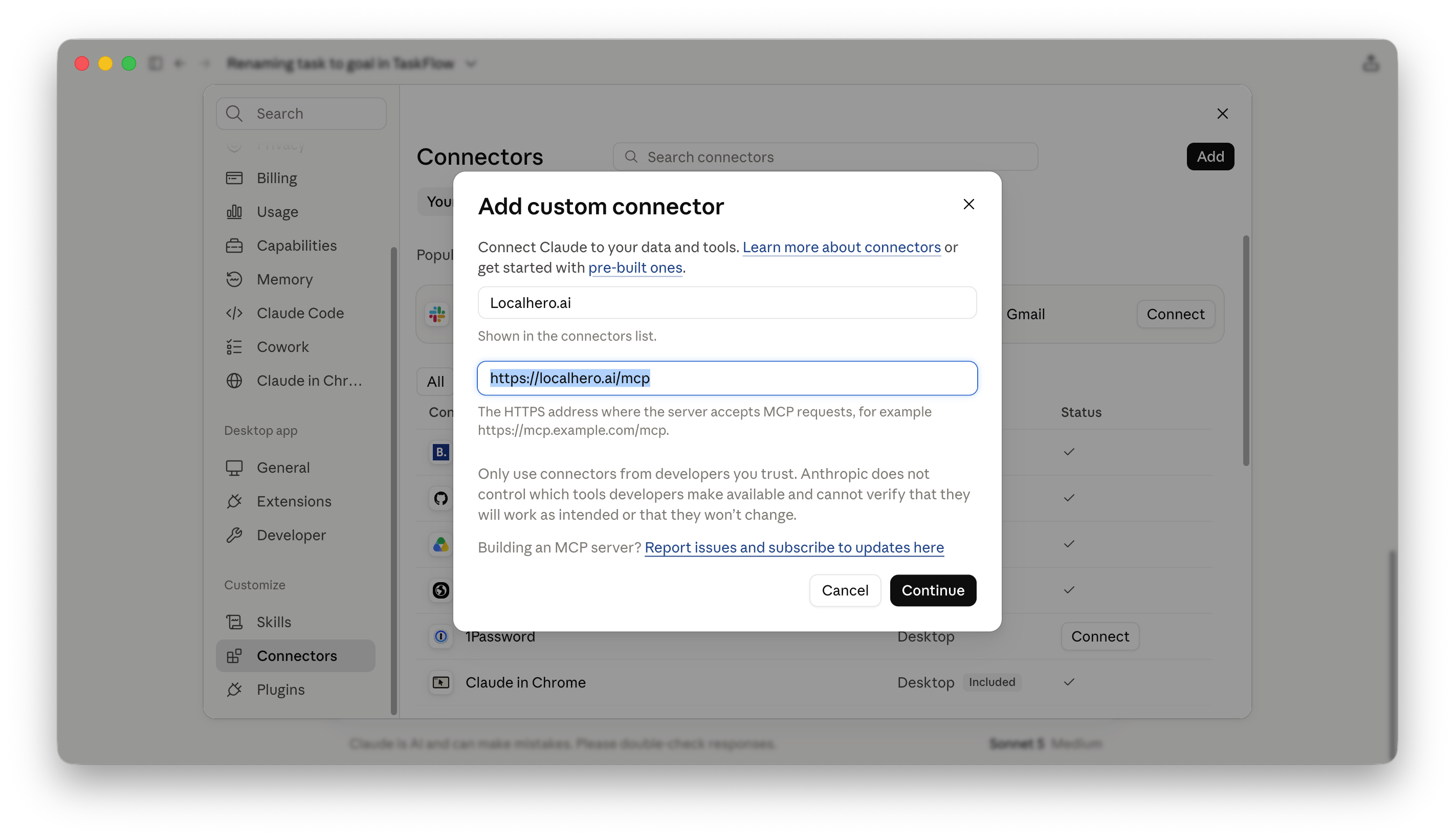
- In Claude, open Settings → Connectors → Add custom connector.
- Enter the name
Localhero.aiand the URLhttps://localhero.ai/mcp, then click Continue. - Click Connect. Localhero.ai shows a consent screen listing what Claude can do. If you are not signed in, complete the usual magic-link login; you will return to the consent screen afterward.
- Click Authorize. Claude now has the tools below.
Access is scoped to the organizations your account belongs to and every edit is attributed to you in the version history, the same as an edit made in the dashboard. Access tokens expire after two hours and are refreshed while the connector stays installed; remove the connector in Claude to stop it.
Supported clients. The custom connector works with claude.ai, Claude Desktop and ChatGPT. Other MCP clients may work; we have not tested them. If you want to use Localhero.ai from another client, tell us which one at hi@localhero.ai.
Connect ChatGPT
ChatGPT connects to the same server as a plugin. Open Settings → Connectors and add a new plugin, then fill in the dialog:
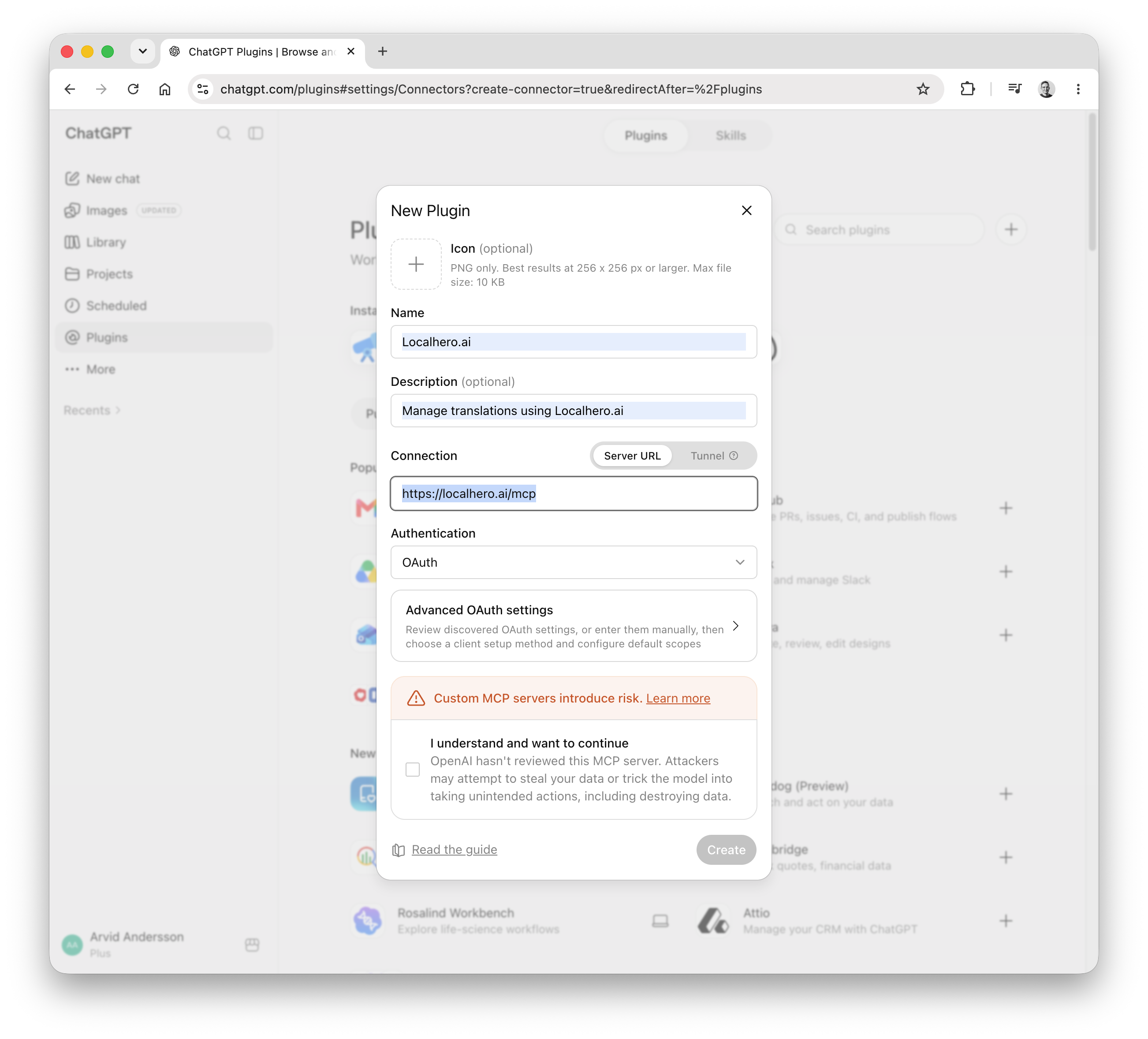
- Name is what you will see in the plugin list. Description is optional.
- Connection stays on Server URL. Enter
https://localhero.ai/mcp. - Authentication is OAuth. Leave Advanced OAuth settings alone; ChatGPT discovers what it needs from the server.
- ChatGPT warns that it has not reviewed the server. Tick I understand and want to continue, otherwise Create stays disabled.
Click Create and sign in to Localhero.ai when ChatGPT sends you to the consent screen. The tools and the access rules are identical to Claude's.
What a session looks like
Ask in plain language and Claude works through the tools. A safe edit follows this explicit sequence:
Change "Get started" to "Start free trial" in the onboarding flow, in all languages and open a PR.
list_projectsto find the project.search_keysfor "Get started". Search matches key names and translated text, so the copy you see on screen is enough. You do not need to know the key.get_project_settings,get_glossaryandget_translationsto review the style, terminology and current values.preview_translation(orpreview_alignmentfor several proposed changes) to preview translations before saving. Review the returned suggestions andchangedflags.update_translationonce per language after review. Use the canonical source locale to change the original copy; use a target locale to change that language's working translation. These are saved in Localhero with version history, but not in GitHub yet.create_prwith the keys that changed. Pass{ name, file }instead of a plain name to ship one of several same-named keys. Localhero.ai opens a pull request on the connected repository with the current translations for those keys—the same mechanism as Sync to GitHub in the dashboard.sync_statusreturns the pull request URL when it is ready.
The pull request goes through your normal review. Share the PR URL with your developer or reviewers so they can check and merge the changes. Reviewers can still adjust the text on the review page before it merges.
Tip: See a string in your product that needs changing? Take a screenshot and tell Claude what to update. Claude can search for the matching key and make the change.
Keys that exist in more than one file
Gettext projects often hold the same msgid in two catalogs, such as django.po and djangojs.po. The key name alone is then ambiguous.
search_keys and list_keys return each key's file. Pass that exact path as file to get_translations, update_translation, preview_translation or preview_alignment, and as { name, file } to create_pr, to act on one of them. Omit file for keys whose name is unique in the project.
Without file, a duplicated name returns an error listing the paths it exists in, so you can retry with one.
get_translations and update_translation each return the file they resolved to, so you can confirm which one was read or written.
Tools
| Tool | What it does |
|---|---|
list_projects |
The projects you have access to, with source and target languages. |
list_keys |
A project's keys with each key's file, alphabetical and paginated (50 per page, up to 200). Pass a prefix like notifications. to drill into one area, or missing_locale to return keys without a translation in that locale. |
search_keys |
Find keys by name or by the translated text, case-insensitive substring match. Minimum three characters, up to 50 results. Each result includes its file. |
get_translations |
A key's current text in every language, with the last-updated time. Takes an optional file. |
get_project_settings |
Brand name, tone of voice, content type, length preference, gender handling, style guide and languages. |
get_glossary |
Glossary terms with context, translation strategy, casing and example translations. |
preview_translation |
Preview translations for one proposed value. Pass proposed_locale (the working language containing that value), optional proposed_value (otherwise the current value), and target_locales. It returns the canonical source locale/value plus each target's current and suggested value and changed flag. It never saves. |
translate_text |
Preview translations for free text. Pass input_locale, text and target_locales; it returns translations with each locale's suggested_value, confidence_score and reasoning. It never saves. |
preview_alignment |
Preview several Save & Align-style changes at once. Pass changes containing key, proposed_locale and proposed_value, plus target_locales. It returns one preview_translation-shaped result per change and never saves. |
update_translation |
Set a key's text in one language. Takes an optional file. Saved to Localhero.ai with version history; reaches the codebase when create_pr runs. |
add_glossary_term |
Add a glossary term. Organization admins only. |
update_glossary_term |
Change an existing term's context, strategy, casing or examples. Organization admins only. |
create_pr |
Send the current translations for the selected keys back to the connected repository in a GitHub pull request. Keys are names, or { name, file } to pick one of several same-named keys. The project must be connected to a repository. |
sync_status |
Whether a pull request from create_pr is ready and its URL. |
Every tool advertises a structured JSON outputSchema; responses also include the same JSON as a text content block for older clients. The schemas are the contract: for example, preview_translation requires project_id, key, canonical_source_locale, proposed_locale, proposed_value, canonical_source_value and changes; translate_text returns project_id, input_locale, text and translations; list_keys returns keys and pagination metadata (page, page_size, total_count, total_pages, has_more).
The read tools are marked read-only in their MCP annotations, so Claude can call them without asking for confirmation. Translation previews (preview_translation, preview_alignment and translate_text) do not save edits, but they spend translation credits and are intentionally not marked read-only; a client may ask for confirmation. They require an active subscription or trial and enough credits. update_translation, glossary writes and create_pr also are not read-only and should be confirmed. create_pr queues the pull request; use its returned sync_id with sync_status to follow progress.
Locale semantics
Projects have one canonical source locale and one or more target locales. preview_translation calls the locale containing the proposed copy proposed_locale; this is a working input and can be the source or a target locale. proposed_value is the copy to translate. target_locales says which project languages to preview (the proposed locale itself is skipped). The response always identifies the canonical source separately, so a proposed target-language rewrite does not silently become the source copy.
translate_text uses the same idea with input_locale and target_locales, and is for text that is not attached to an existing key. update_translation is the operation that saves a decision: locale equal to the project's source locale changes canonical source copy; any other locale changes only that locale's working translation.
FAQ
Do I need a GitHub account to use it?
No. You need a Localhero.ai account with access to the project. The pull request is opened by the Localhero.ai GitHub App on the repository the project is connected to.
Which server should I point another MCP client at?
https://localhero.ai/mcp over streamable HTTP. Protected-resource metadata is at https://localhero.ai/.well-known/oauth-protected-resource and OAuth discovery at https://localhero.ai/.well-known/oauth-authorization-server, scope mcp:access, PKCE required. Clients identify themselves with a client ID metadata document, so there is nothing to register by hand.
Further reading
- Review workflow, where the pull request's translations get approved.
- GitHub App, the piece that opens the pull request.
- AI coding agent skill, the developer-side integration.
Last updated
Klar til å prøve?
Kom i gang på noen minutter. Du trenger ikke kredittkort.