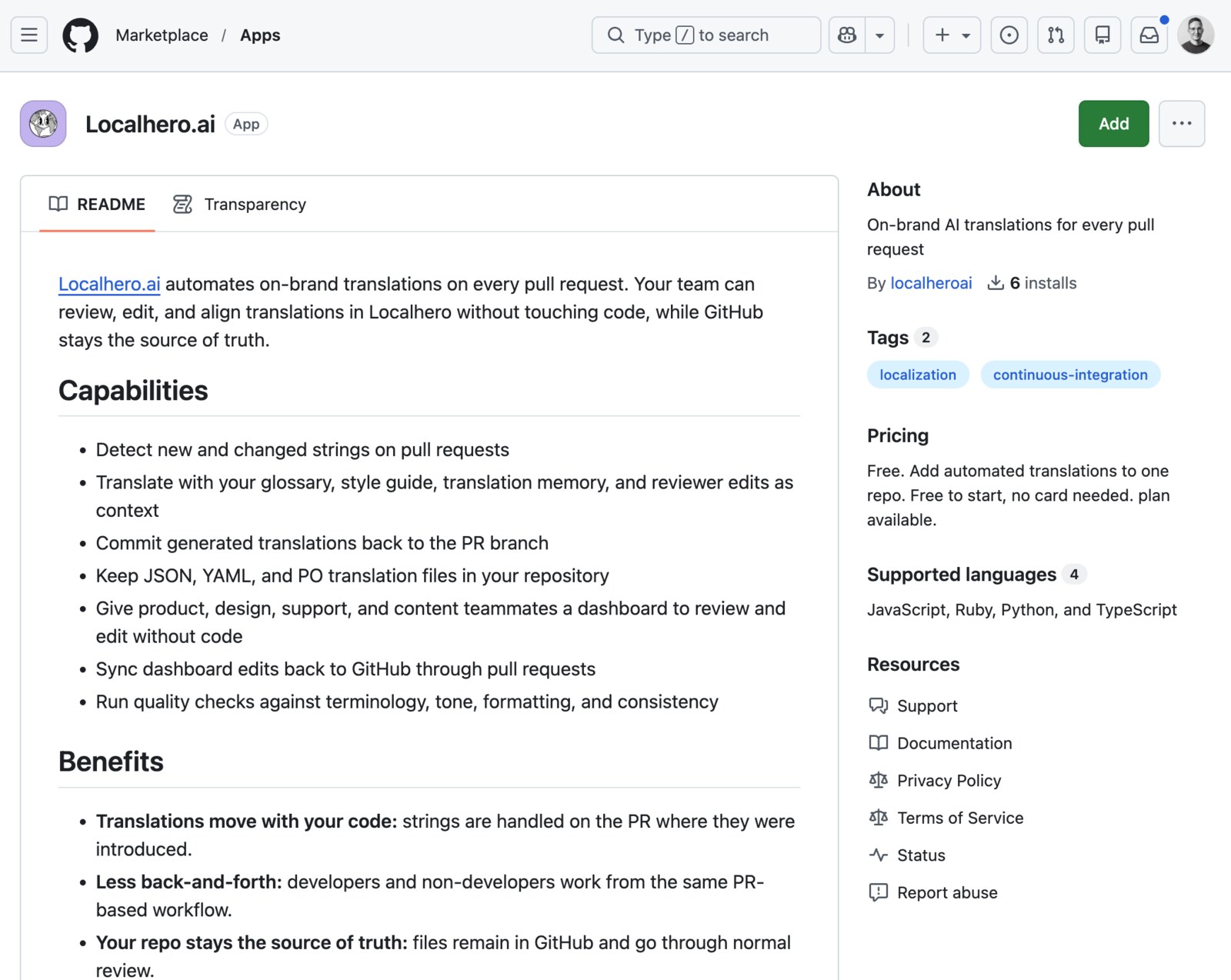
We listed the Localhero.ai GitHub App on the GitHub Marketplace. It went through GitHub's review and is live for anyone to install. A few teams have already installed it, which is nice to see.
Currently the free plan is available through the Marketplace, one repo per install, no card needed.
What it actually does
The short version is on the listing: on-brand AI translations on every pull request, with your repo as the source of truth.
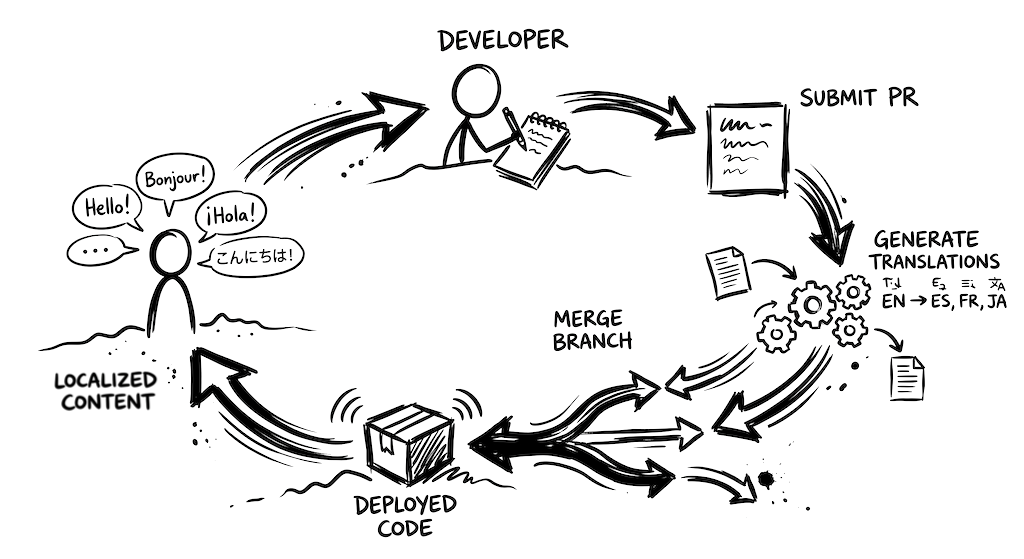
The slightly longer version, since the listing has to be brief: when you install the App on a repo, it opens a setup PR with a localhero.json config and a workflow file under .github/workflows/. You review that PR like any other PR, adjust if you want, and merge. From then on, translations are triggered automatically when you push to GitHub, on the PR where the new or changed strings were introduced. The strings get translated, committed back to the PR branch, and your team can review and tweak them in the Localhero.ai dashboard. Edits sync back to GitHub through a pull request.
Two things worth knowing:
- The App itself does not translate. It provisions the workflow that does. The actual translation runs inside your GitHub Actions runner, using our GitHub Action. The reason we built it this way is that the workflow file sits in your repo, so you can read it, pin a version, and compose it with whatever else your CI already does (a Django
makemessagesstep, a Lingui extract, a gettext.pokey extraction, type checks, anything). - The repo stays the source of truth. Translation files live in your codebase, go through normal code review, and ship with your release.
What is new vs. what was already there
If you already use our CLI or GitHub Action, nothing changes. The Marketplace listing is just a different install path that lands you on the same workflow.
What's basically new is discoverability. Before, finding Localhero.ai meant landing on our site first and then getting to a repo. GitHub is a place product teams already spend a lot of time, and the Marketplace is where they go to find ways to improve and automate their workflows. Having a listing there gives us a home alongside the rest of the tools they use, and the install is a shorter path to actually trying the free plan, two clicks from a page they probably already know how to find.
How it fits
Three pieces, same backend:
- GitHub App on the Marketplace. One-click install, opens a setup PR for you. Best when you want the lowest-friction starting point.
- GitHub Action. Composes into a CI pipeline however you want. The App installs this for you. You can also just use it directly without the App.
- CLI. Runs translations from your machine or from a coding agent like Claude Code or Cursor. Useful for local iteration and for setups where CI is not the right trigger.
Glossary, style guide, translation memory, and brand voice profile are shared across all three.
If you have used Lokalise's GitHub integration or Crowdin's GitHub Action, the shape is different. Those are dashboard-first products where GitHub is a sync surface, so the workflow is edit in the dashboard, push to a branch, open a PR.
Ours is the other way around. The PR is the unit of work, the AI translates inside CI, and the dashboard is there for the cases where you want to adjust, review, or get quality insights. The idea underneath is that most teams want translations to just work.
Add new source strings, ship the feature, trust that the target languages get translated on the way and that the result matches the brand voice and stays consistent with the rest of the project. A new feature should not stall on release while you coordinate translations or wait for someone to have time. Just ship.
FAQ
Is the Localhero.ai GitHub App free? The Marketplace plan is currently free, with one repo per install and no card needed. If you need more repos or paid features (more credits, glossary at organization scope, multiple languages at scale), you can subscribe on localhero.ai/pricing and connect the same App to your account.
Does the GitHub App also translate, or do I still need the Action?
The App does not translate on its own. It installs and configures the workflow that runs our GitHub Action in your CI. The setup PR includes both pieces, so you really only have to install one thing. Because the workflow file is just YAML in your repo, you can compose it with whatever else your CI already does, like a gettext xgettext or Django makemessages step before, or an i18n-tasks normalize step after. You can also pin the Action version, scope it to certain paths, or gate it on labels, instead of that logic sitting in a third-party dashboard.
What formats and frameworks does it support? JSON, YAML, and PO. Covers Rails, Django, React (i18next, next-intl), Next.js, Lingui, and most other setups that follow standard i18n file formats. For anything more exotic, the CLI can usually handle it; ping us at hi@localhero.ai before you spend time on a workaround.
Can I use the App without the dashboard? Yes, the loop that translates on PRs and commits back runs in CI without anyone opening it. That said, the dashboard is more than a review surface for non-developers. It is where you configure the project after install (source and target languages, glossary, style guide, brand voice), where translation memory builds up over time, where version history lives per key so you can see how a translation evolved and roll back if needed, and where quality issues surface against your terminology and tone rules. Even dev-only teams tend to dip in for those.
Will it commit to my main branch?
No. The Action only commits to the branch of the PR it is running on. The dashboard's Export to GitHub
action opens a new pull request, so changes still go through your normal review.
Install
Install the GitHub App from the Marketplace. Pick a repo, choose a source and a couple of target languages, review the setup PR, merge it. The next PR you open with new strings gets translated.
Questions or want a hand setting it up, drop us a line at hi@localhero.ai.